
IP Security
| Document revision: | 3.4 (Tue Nov 22 14:19:15 GMT 2005) |
| Applies to: | V2.9 |
General Information
Specifications
Packages required: securityLicense required: Level1
Submenu level: /ip ipsec
Standards and Technologies: IPsec
Hardware usage: consumes a lot of CPU time (Intel Pentium MMX or AMD K6 suggested as a minimal configuration)
Related Documents
Description
IPsec (IP Security) supports secure (encrypted) communications over IP networks.
EncryptionAfter packet is src-natted, but before putting it into interface queue, IPsec policy database is consulted to find out if packet should be encrypted. Security Policy Database (SPD) is a list of rules that have two parts:
- Packet matching - packet source/destination, protocol and ports (for TCP and UDP) are compared to values in policy rules, one after another
- Action - if rule matches action specified in rule is performed:
- accept - continue with packet as if there was no IPsec
- drop - drop packet
- encrypt - encrypt packet
Each SPD rule can be associated with several Security Associations (SA) that determine packet encryption parameters (key, algorithm, SPI).
Note that packet can only be encrypted if there is usable SA for policy rule. By setting SPD rule security "level" user can control what happens when there is no valid SA for policy rule:
- use - if there is no valid SA, send packet unencrypted (like accept rule)
- acquire - send packet unencrypted, but ask IKE daemon to establish new SA
- require - drop packet, and ask IKE daemon to establish new SA.
When encrypted packet is received for local host (after dst-nat and input filter), the appropriate SA is looked up to decrypt it (using packet source, destination, security protocol and SPI value). If no SA is found, the packet is dropped. If SA is found, packet is decrypted. Then decrypted packet's fields are compared to policy rule that SA is linked to. If the packet does not match the policy rule it is dropped. If the packet is decrypted fine (or authenticated fine) it is "received once more" - it goes through dst-nat and routing (which finds out what to do - either forward or deliver locally) again.
Note that before forward and input firewall chains, a packet that was not decrypted on local host is compared with SPD reversing its matching rules. If SPD requires encryption (there is valid SA associated with matching SPD rule), the packet is dropped. This is called incoming policy check.
Internet Key ExchangeThe Internet Key Exchange (IKE) is a protocol that provides authenticated keying material for Internet Security Association and Key Management Protocol (ISAKMP) framework. There are other key exchange schemes that work with ISAKMP, but IKE is the most widely used one. Together they provide means for authentication of hosts and automatic management of security associations (SA).
Most of the time IKE daemon is doing nothing. There are two possible situations when it is activated:
- There is some traffic caught by a policy rule which needs to become encrypted or authenticated, but the policy doesn't have any SAs. The policy notifies IKE daemon about that, and IKE daemon initiates connection to remote host.
- IKE daemon responds to remote connection.
In both cases, peers establish connection and execute 2 phases:
- Phase 1 - The peers agree upon algorithms they will use in the following IKE messages and authenticate. The keying material used to derive keys for all SAs and to protect following ISAKMP exchanges between hosts is generated also.
- Phase 2 - The peers establish one or more SAs that will be used by IPsec to encrypt data. All SAs established by IKE daemon will have lifetime values (either limiting time, after which SA will become invalid, or amount of data that can be encrypted by this SA, or both).
There are two lifetime values - soft and hard. When SA reaches it's soft lifetime treshold, the IKE daemon receives a notice and starts another phase 2 exchange to replace this SA with fresh one. If SA reaches hard lifetime, it is discarded.
IKE can optionally provide a Perfect Forward Secrecy (PFS), whish is a property of key exchanges, that, in turn, means for IKE that compromising the long term phase 1 key will not allow to easily gain access to all IPsec data that is protected by SAs established through this phase 1. It means an additional keying material is generated for each phase 2.
Generation of keying material is computationally very expensive. Exempli gratia, the use of modp8192 group can take several seconds even on very fast computer. It usually takes place once per phase 1 exchange, which happens only once between any host pair and then is kept for long time. PFS adds this expensive operation also to each phase 2 exchange.
Diffie-Hellman MODP GroupsDiffie-Hellman (DH) key exchange protocol allows two parties without any initial shared secret to create one securely. The following Modular Exponential (MODP) Diffie-Hellman (also known as "Oakley") Groups are supported:
| Diffie-Hellman Group | Modulus | Reference |
| Group 1 | 768 bits | RFC2409 |
| Group 2 | 1024 bits | RFC2409 |
| Group 5 | 1536 bits | RFC3526 |
To avoid problems with IKE packets hit some SPD rule and require to encrypt it with not yet established SA (that this packet perhaps is trying to establish), locally originated packets with UDP source port 500 are not processed with SPD. The same way packets with UDP destination port 500 that are to be delivered locally are not processed in incoming policy check.
Setup ProcedureTo get IPsec to work with automatic keying using IKE-ISAKMP you will have to configure policy, peer and proposal (optional) entries.
For manual keying you will have to configure policy and manual-sa entries.
Policy Settings
Submenu level: /ip ipsec policyDescription
Policy table is needed to determine whether encryption should be applied to a packet.
Property Description
action (accept | drop | encrypt; default: accept) - specifies what action to undertake with a packet that matches the policydrop - drop the packet
encrypt - apply transformations specified in this policy and it's SA
inherit - do not change the field
set - set the field, so that each packet matching the rule will not be fragmented
acquire - skip this transform, but acquire SA for it from IKE daemon
require - drop packet but acquire SA
no-phase2 - no keys are estabilished at the moment
estabilished - Appropriate SAs are in place and everything should be working fine
Notes
All packets are IPIP encapsulated in tunnel mode, and their new IP header src-address and dst-address are set to sa-src-address and sa-dst-address values of this policy. If you do not use tunnel mode (id est you use transport mode), then only packets whose source and destination addresses are the same as sa-src-address and sa-dst-address can be processed by this policy. Transport mode can only work with packets that originate at and are destined for IPsec peers (hosts that established security associations). To encrypt traffic between networks (or a network and a host) you have to use tunnel mode.
It is good to have dont-fragment cleared because encrypted packets are always bigger than original and thus they may need fragmentation.
If you are using IKE to establish SAs automatically, then policies on both routers must exactly match each other, id est src-address=1.2.3.0/27 on one router and dst-address=1.2.3.0/28 on another would not work. Source address values on one router MUST be equal to destination address values on the other one, and vice versa.
Example
To add a policy to encrypt all the traffic between two hosts (10.0.0.147 and 10.0.0.148), we need do the following:
[admin@WiFi] ip ipsec policy> add sa-src-address=10.0.0.147 \
\... sa-dst-address=10.0.0.148 action=encrypt
[admin@WiFi] ip ipsec policy> print
Flags: X - disabled, D - dynamic, I - invalid
 0   src-address=10.0.0.147/32:any dst-address=10.0.0.148/32:any protocol=all
     action=encrypt level=require ipsec-protocols=esp tunnel=no
     sa-src-address=10.0.0.147 sa-dst-address=10.0.0.148 proposal=default
     manual-sa=none dont-fragment=clear

[admin@WiFi] ip ipsec policy>
to view the policy statistics, do the following:
[admin@WiFi] ip ipsec policy> print stats
Flags: X - disabled, D - dynamic, I - invalid
  0   src-address=10.0.0.147/32:any dst-address=10.0.0.148/32:any
      protocol=all ph2-state=no-phase2 in-accepted=0 in-dropped=0
      out-accepted=0 out-dropped=0 encrypted=0 not-encrypted=0 decrypted=0
      not-decrypted=0

[admin@WiFi] ip ipsec policy>
Peers
Submenu level: /ip ipsec peerDescription
Peer configuration settings are used to establish connections between IKE daemons (phase 1 configuration). This connection then will be used to negotiate keys and algorithms for SAs.
Property Description
address (IP address/netmask:port; default: 0.0.0.0/32:500) - address prefix. If remote peer's address matches this prefix, then this peer configuration is used while authenticating and establishing phase 1. If several peer's addresses matches several configuration entries, the most specific one (i.e. the one with largest netmask) will be useddh-group (multiple choice: modp768 | modp1024 | modp1536; default: esp) - Diffie-Hellman MODP group (cipher strength)enc-algorithm (multiple choice: des | 3des | aes-128 | aes-192 | aes-256; default: 3des) - encryption algorithm. Algorithms are named in strength increasing orderexchange-mode (multiple choice: main | aggressive | base; default: main) - different ISAKMP phase 1 exchange modes according to RFC 2408.DO not use other modes then main unless you know what you are doinggenerate-policy (yes | no; default: no) - allow this peer to establish SA for non-existing policies. Such policies are created dynamically for the lifetime of SA. This way it is possible, for example, to create IPsec secured L2TP tunnels, or any other setup where remote peer's IP address is not known at configuration timehash-algorithm (multiple choice: md5 | sha; default: md5) - hashing algorithm. SHA (Secure Hash Algorithm) is stronger, but slowerlifebytes (integer; default: 0) - phase 1 lifetime: specifies how much bytes can be transferred before SA is discardedexact - require lifetimes to be the same
obey - accept whatever is sent by an initiator
strict - If proposed lifetime IS longer than default then reject proposal otherwise accept proposed lifetime
Notes
AES (Advanced Encryption Standard) encryption algorithms are much faster than DES, so it is recommended to use this algorithm class whenever possible. But, AES's speed is also its drawback as it potentially can be cracked faster, so use AES-256 when you need security or AES-128 when speed is also important.
Both peers MUST have the same encryption and authentication algorithms, DH group and exchange mode. Some legacy hardware may support only DES and MD5.
You should set generate-policy flag to yes only for trusted peers, because there is no verification done for the established policy. To protect yourself against possible unwanted events, add policies with action=accept for all networks you don't want to be encrypted at the top of policy list. Since dynamic policies are added at the bottom of the list, they will not be able to override your configuration.
Example
To define new peer configuration for 10.0.0.147 peer with secret=gwejimezyfopmekun:
[admin@WiFi] ip ipsec peer>add address=10.0.0.147/32 \
\... secret=gwejimezyfopmekun
[admin@WiFi] ip ipsec peer> print
Flags: X - disabled
  0   address=10.0.0.147/32:500 secret="gwejimezyfopmekun" generate-policy=no
      exchange-mode=main send-initial-contact=yes proposal-check=obey
      hash-algorithm=md5 enc-algorithm=3des dh-group=modp1024 lifetime=1d
      lifebytes=0

[admin@WiFi] ip ipsec peer>
Remote Peer Statistics
Submenu level: /ip ipsec remote-peersDescription
This submenu provides you with various statistics about remote peers that currently have established phase 1 connections with this router. Note that if peer doesn't show up here, it doesn't mean that no IPsec traffic is being exchanged with it. For example, manually configured SAs will not show up here.
Property Description
estabilished (read-only: text) - shows date and time when phase 1 was established with the peerlocal-address (read-only: IP address) - local ISAKMP SA addressph2-active (read-only: integer) - how many phase 2 negotiations with this peer are currently taking placeph2-total (read-only: integer) - how many phase 2 negotiations with this peer took placeremote-address (read-only: IP address) - peer's IP addressside (multiple choice, read-only: initiator | responder) - shows which side initiated the connectionresponder - phase 1 negotiation was started by peer
Example
To see currently estabilished SAs:
[admin@WiFi] ip ipsec> remote-peers print
  0 local-address=10.0.0.148 remote-address=10.0.0.147 state=established
    side=initiator established=jan/25/2003 03:34:45 ph2-active=0 ph2-total=1
[admin@WiFi] ip ipsec>
Installed SAs
Submenu level: /ip ipsec installed-saDescription
This facility provides information about installed security associations including the keys
Property Description
add-lifetime (read-only: time) - soft/hard expiration time counted from installation of SAauth-algorithm (multiple choice, read-only: none | md5 | sha1) - authentication algorithm used in SAauth-key (read-only: text) - authentication key presented in form of hex stringcurrent-addtime (read-only: text) - time when this SA was installedcurrent-bytes (read-only: integer) - amount of data processed by this SA's crypto algorithmscurrent-usetime (read-only: text) - time when this SA was first useddirection (multiple choice, read-only: in | out) - SA directiondst-address (read-only: IP address) - destination address of SA taken from respective policyenc-algorithm (multiple choice, read-only: none | des | 3des | aes) - encryption algorithm used in SAenc-key (read-only: text) - encryption key presented in form of hex string (not applicable to AH SAs)lifebytes (read-only: integer) - soft/hard expiration threshold for amount of processed datareplay (read-only: integer) - size of replay window presented in bytes. This window protects the receiver against replay attacks by rejecting old or duplicate packets.spi (read-only: integer) - SPI value of SA, represented in hexadecimal formsrc-address (read-only: IP address) - source address of SA taken from respective policystate (multiple choice, read-only: larval | mature | dying | dead) - SA living phaseuse-lifetime (read-only: time) - soft/hard expiration time counted from the first use of SAExample
Sample printout looks as follows:
[admin@WiFi] ip ipsec> installed-sa print
Flags: A - AH, E - ESP, P - pfs, M - manual
  0 E   spi=E727605 direction=in src-address=10.0.0.148
        dst-address=10.0.0.147 auth-algorithm=sha1 enc-algorithm=3des
        replay=4 state=mature
        auth-key="ecc5f4aee1b297739ec88e324d7cfb8594aa6c35"
        enc-key="d6943b8ea582582e449bde085c9471ab0b209783c9eb4bbd"
        add-lifetime=24m/30m use-lifetime=0s/0s lifebytes=0/0
        current-addtime=jan/28/2003 20:55:12
        current-usetime=jan/28/2003 20:55:23 current-bytes=128
  1 E   spi=E15CEE06 direction=out src-address=10.0.0.147
        dst-address=10.0.0.148 auth-algorithm=sha1 enc-algorithm=3des
        replay=4 state=mature
        auth-key="8ac9dc7ecebfed9cd1030ae3b07b32e8e5cb98af"
        enc-key="8a8073a7afd0f74518c10438a0023e64cc660ed69845ca3c"
        add-lifetime=24m/30m use-lifetime=0s/0s lifebytes=0/0
        current-addtime=jan/28/2003 20:55:12
        current-usetime=jan/28/2003 20:55:12 current-bytes=512
[admin@WiFi] ip ipsec>
Flushing Installed SA Table
Command name: /ip ipsec installed-sa flushDescription
Sometimes after incorrect/incomplete negotiations took place, it is required to flush manually the installed SA table so that SA could be renegotiated. This option is provided by the flush command.
Property Description
sa-type (multiple choice: ah | all | esp; default: all) - specifies SA types to flushesp - delete ESP protocol SAs only
all - delete both ESP and AH protocols SAs
Example
To flush all the SAs installed:
[admin@MikroTik] ip ipsec installed-sa> flush
[admin@MikroTik] ip ipsec installed-sa> print
[admin@MikroTik] ip ipsec installed-sa>
Counters
Submenu level: /ip ipsec countersProperty Description
in-accept (read-only: integer) - shows how many incoming packets were matched by accept policyin-accept-isakmp (read-only: integer) - shows how many incoming UDP packets on port 500 were let through without matching a policyin-decrypted (read-only: integer) - shows how many incoming packets were successfully decryptedin-drop (read-only: integer) - shows how many incoming packets were matched by drop policy (or encrypt policy with level=require that does not have all necessary SAs)in-drop-encrypted-expected (read-only: integer) - shows how many incoming packets were matched by encrypt policy and dropped because they were not encryptedout-accept (read-only: integer) - shows how many outgoing packets were matched by accept policy (including the default "accept all" case)out-accept-isakmp (read-only: integer) - shows how many locally originated UDP packets on source port 500 (which is how ISAKMP packets look) were let through without policy matchingout-drop (read-only: integer) - shows how many outgoing packets were matched by drop policy (or encrypt policy with level=require that does not have all necessary SAs)out-encrypt (read-only: integer) - shows how many outgoing packets were encrypted successfullyExample
To view current statistics:
[admin@WiFi] ip ipsec> counters print
                    out-accept: 6
             out-accept-isakmp: 0
                      out-drop: 0
                   out-encrypt: 7
                     in-accept: 12
              in-accept-isakmp: 0
                       in-drop: 0
                  in-decrypted: 7
    in-drop-encrypted-expected: 0
[admin@WiFi] ip ipsec>
Application Examples
MikroTik Router to MikroTik Router
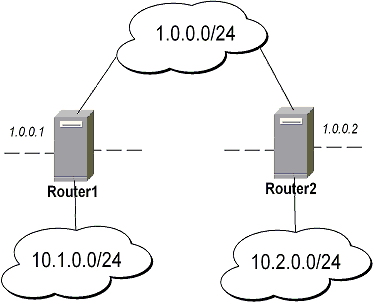
-
transport mode example using ESP with automatic keying
-
for Router1
[admin@Router1] > ip ipsec policy add sa-src-address=1.0.0.1 sa-dst-address=1.0.0.2 \
\... action=encrypt
[admin@Router1] > ip ipsec peer add address=1.0.0.2 \
\... secret="gvejimezyfopmekun"
-
for Router2
[admin@Router2] > ip ipsec policy add sa-src-address=1.0.0.2 sa-dst-address=1.0.0.1 \
\... action=encrypt
[admin@Router2] > ip ipsec peer add address=1.0.0.1 \
\... secret="gvejimezyfopmekun"
-
-
transport mode example using ESP with automatic keying and automatic policy generating on Router 1 and static policy on Router 2
-
for Router1
[admin@Router1] > ip ipsec peer add address=1.0.0.0/24 \
\... secret="gvejimezyfopmekun" generate-policy=yes
-
for Router2
[admin@Router2] > ip ipsec policy add sa-src-address=1.0.0.2 sa-dst-address=1.0.0.1 \
\... action=encrypt
[admin@Router2] > ip ipsec peer add address=1.0.0.1 \
\... secret="gvejimezyfopmekun"
-
-
tunnel mode example using AH with manual keying
-
for Router1
[admin@Router1] > ip ipsec manual-sa add name=ah-sa1 \
\... ah-spi=0x101/0x100 ah-key=abcfed
[admin@Router1] > ip ipsec policy add src-address=10.1.0.0/24 \
\... dst-address=10.2.0.0/24 action=encrypt ipsec-protocols=ah \
\... tunnel=yes sa-src=1.0.0.1 sa-dst=1.0.0.2 manual-sa=ah-sa1
-
for Router2
[admin@Router2] > ip ipsec manual-sa add name=ah-sa1 \
\... ah-spi=0x100/0x101 ah-key=abcfed
[admin@Router2] > ip ipsec policy add src-address=10.2.0.0/24 \
\... dst-address=10.1.0.0/24 action=encrypt ipsec-protocols=ah \
\... tunnel=yes sa-src=1.0.0.2 sa-dst=1.0.0.1 manual-sa=ah-sa1
-
IPsec Between two Masquerading MikroTik Routers
-
Add accept and masquerading rules in SRC-NAT
-
for Router1
[admin@Router1] > ip firewall nat add chain=srcnat src-address=10.1.0.0/24 \
\... dst-address=10.2.0.0/24
[admin@Router1] > ip firewall nat add chain=srcnat out-interface=public \
\... action=masquerade
-
for Router2
[admin@Router2] > ip firewall nat chain=srcnat add src-address=10.2.0.0/24 \
\... dst-address=10.1.0.0/24
[admin@Router2] > ip firewall nat chain=srcnat add out-interface=public \
\... action=masquerade
-
-
configure IPsec
-
for Router1
[admin@Router1] > ip ipsec policy add src-address=10.1.0.0/24 \
\... dst-address=10.2.0.0/24 action=encrypt tunnel=yes \
\... sa-src-address=1.0.0.1 sa-dst-address=1.0.0.2
[admin@Router1] > ip ipsec peer add address=1.0.0.2 \
\... exchange-mode=aggressive secret="gvejimezyfopmekun"
-
for Router2
[admin@Router2] > ip ipsec policy add src-address=10.2.0.0/24 \
\... dst-address=10.1.0.0/24 action=encrypt tunnel=yes \
\... sa-src-address=1.0.0.2 sa-dst-address=1.0.0.1
[admin@Router2] > ip ipsec peer add address=1.0.0.1 \
\... exchange-mode=aggressive secret="gvejimezyfopmekun"
-
MikroTik router to CISCO Router

We will configure IPsec in tunnel mode in order to protect traffic between attached subnets.
-
Add peer (with phase1 configuration parameters), DES and SHA1 will be used to protect IKE traffic
-
for MikroTik router
[admin@MikroTik] > ip ipsec peer add address=10.0.1.2 \
\... secret="gvejimezyfopmekun" enc-algorithm=des
-
for CISCO router
! Configure ISAKMP policy (phase1 config, must match configuration
! of "/ip ipsec peer" on RouterOS). Note that DES is default
! encryption algorithm on Cisco. SHA1 is default authentication
! algorithm
crypto isakmp policy 9
  encryption des
  authentication pre-share
  group 2
  hash md5
  exit

! Add preshared key to be used when talking to RouterOS
crypto isakmp key gvejimezyfopmekun address 10.0.1.1 255.255.255.255
-
-
Set encryption proposal (phase2 proposal - settings that will be used to encrypt actual data) to use DES to encrypt data
-
for MikroTik router
[admin@MikroTik] > ip ipsec proposal set default enc-algorithms=des
-
for CISCO router
! Create IPsec transform set - transformations that should be applied to
! traffic - ESP encryption with DES and ESP authentication with SHA1
! This must match "/ip ipsec proposal"
crypto ipsec transform-set myset esp-des esp-sha-hmac
  mode tunnel
  exit
-
-
Add policy rule that matches traffic between subnets and requires encryption with ESP in tunnel mode
-
for MikroTik router
[admin@MikroTik] > ip ipsec policy add \
\... src-address=10.0.0.0/24 dst-address=10.0.2.0/24 action=encrypt \
\... tunnel=yes sa-src=10.0.1.1 sa-dst=10.0.1.2
-
for CISCO router
! Create access list that matches traffic that should be encrypted
access-list 101 permit ip 10.0.2.0 0.0.0.255 10.0.0.0 0.0.0.255
! Create crypto map that will use transform set "myset", use peer 10.0.1.1
! to establish SAs and encapsulate traffic and use access-list 101 to
! match traffic that should be encrypted
crypto map mymap 10 ipsec-isakmp
  set peer 10.0.1.1
  set transform-set myset
  set pfs group2
  match address 101
  exit
! And finally apply crypto map to serial interface:
interface Serial 0
  crypto map mymap
  exit
-
-
Testing the IPsec tunnel
-
on MikroTik router we can see installed SAs
[admin@MikroTik] ip ipsec installed-sa> print Flags: A - AH, E - ESP, P - pfs, M - manual 0 E spi=9437482 direction=out src-address=10.0.1.1 dst-address=10.0.1.2 auth-algorithm=sha1 enc-algorithm=des replay=4 state=mature auth-key="9cf2123b8b5add950e3e67b9eac79421d406aa09" enc-key="ffe7ec65b7a385c3" add-lifetime=24m/30m use-lifetime=0s/0s lifebytes=0/0 current-addtime=jul/12/2002 16:13:21 current-usetime=jul/12/2002 16:13:21 current-bytes=71896 1 E spi=319317260 direction=in src-address=10.0.1.2 dst-address=10.0.1.1 auth-algorithm=sha1 enc-algorithm=des replay=4 state=mature auth-key="7575f5624914dd312839694db2622a318030bc3b" enc-key="633593f809c9d6af" add-lifetime=24m/30m use-lifetime=0s/0s lifebytes=0/0 current-addtime=jul/12/2002 16:13:21 current-usetime=jul/12/2002 16:13:21 current-bytes=0 [admin@MikroTik] ip ipsec installed-sa> -
on CISCO router
cisco# show interface Serial 0
interface: Serial1
    Crypto map tag: mymap, local addr. 10.0.1.2
   local  ident (addr/mask/prot/port): (10.0.2.0/255.255.255.0/0/0)
   remote ident (addr/mask/prot/port): (10.0.0.0/255.255.255.0/0/0)
   current_peer: 10.0.1.1
     PERMIT, flags={origin_is_acl,}
    #pkts encaps: 1810, #pkts encrypt: 1810, #pkts digest 1810
    #pkts decaps: 1861, #pkts decrypt: 1861, #pkts verify 1861
    #pkts compressed: 0, #pkts decompressed: 0
    #pkts not compressed: 0, #pkts compr. failed: 0, #pkts decompress failed: 0
    #send errors 0, #recv errors 0
     local crypto endpt.: 10.0.1.2, remote crypto endpt.: 10.0.1.1
     path mtu 1500, media mtu 1500
     current outbound spi: 1308650C
     inbound esp sas:
      spi: 0x90012A(9437482)
        transform: esp-des esp-sha-hmac ,
        in use settings ={Tunnel, }
        slot: 0, conn id: 2000, flow_id: 1, crypto map: mymap
        sa timing: remaining key lifetime (k/sec): (4607891/1034)
        IV size: 8 bytes
        replay detection support: Y
     inbound ah sas:
     inbound pcp sas:
     outbound esp sas:
      spi: 0x1308650C(319317260)
        transform: esp-des esp-sha-hmac ,
        in use settings ={Tunnel, }
        slot: 0, conn id: 2001, flow_id: 2, crypto map: mymap
        sa timing: remaining key lifetime (k/sec): (4607893/1034)
        IV size: 8 bytes
        replay detection support: Y
     outbound ah sas:
     outbound pcp sas:
-
MikroTik Router and Linux FreeS/WAN
In the test scenario we have 2 private networks: 10.0.0.0/24 connected to the MT and 192.168.87.0/24 connected to Linux. MT and Linux are connected together over the "public" network 192.168.0.0/24:
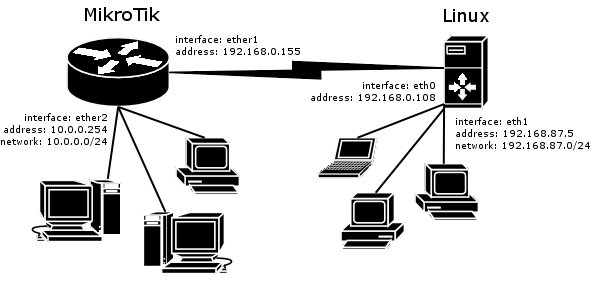
-
FreeS/WAN configuration:
config setup interfaces="ipsec0=eth0" klipsdebug=none plutodebug=all plutoload=%search plutostart=%search uniqueids=yes conn %default keyingtries=0 disablearrivalcheck=no authby=rsasig conn mt left=192.168.0.108 leftsubnet=192.168.87.0/24 right=192.168.0.155 rightsubnet=10.0.0.0/24 authby=secret pfs=no auto=add -
ipsec.secrets config file:
192.168.0.108 192.168.0.155 : PSK "gvejimezyfopmekun"
-
MikroTik Router configuration:
[admin@MikroTik] > /ip ipsec peer add address=192.168.0.108 \
\... secret="gvejimezyfopmekun" hash-algorithm=md5  enc-algorithm=3des \
\... dh-group=modp1024 lifetime=28800s

[admin@MikroTik] > /ip ipsec proposal auth-algorithms=md5 \
\... enc-algorithms=3des pfs-group=none

[admin@MikroTik] > /ip ipsec policy add sa-src-address=192.168.0.155 \
\... sa-dst-address=192.168.0.108 src-address=10.0.0.0/24 \
\... dst-address=192.168.87.0/24 tunnel=yes