
VRRP
| Document revision: | 1.6 (February 6, 2008, 4:08 GMT) |
| Applies to: | V3.0 |
General Information
Summary
Virtual Router Redundancy Protocol (VRRP) implementation in the MikroTik RouterOS is RFC2338 compliant. VRRP protocol is used to ensure constant access to some resources. Two or more routers (referred as VRRP Routers in this context) create a highly available cluster (also referred as Virtual routers) with dynamic fail over. Each router can participate in not more than 255 virtual routers per interface. Many modern routers support this protocol.
Network setups with VRRP clusters provide high availability for routers without using clumsy ping-based scripts.
Specifications
Packages required: systemLicense required: Level1
Submenu level: /interface vrrp
Standards and Technologies: VRRP, AH, HMAC-MD5-96 within ESP and AH
Hardware usage: Not significant
Description
Virtual Router Redundancy Protocol is an election protocol that provides high availability for routers. A number of routers may participate in one or more virtual routers. One or more IP addresses may be assigned to a virtual router. A node of a virtual router can be in one of the following states:
- MASTER state, when the node answers all the requests to the instance's IP addresses. There may only be one MASTER node in a virtual router. This node sends VRRP advertisement packets to all the backup routers (using multicast address) every once in a while (set in interval property).
- BACKUP state, when the VRRP router monitors the availability and state of the Master Router. It does not answer any requests to the instance's IP addresses. Should master become unavailable (if at least three sequential VRRP packets are lost), election process happens, and new master is proclaimed based on its priority. For more details on virtual routers, see RFC2338.
Notes
VRRP does not currently work on VLAN interfaces, as it is impossible to have the MAC address of a VLAN interface different from the MAC address of the physical interface it is put on.
VRRP Routers
Submenu level: /interface vrrpDescription
A number of VRRP routers may form a virtual router. The maximal number of clusters on one network is 255 each having a unique VRID (Virtual Router ID). Each router participating in a VRRP cluster must have it priority set to a valid value. Each VRRP instance is configured like a virtual interface that bound to a real interface (in a similar manner VLAN is). VRRP addresses are then put on the virtual VRRP interface normally. The VRRP master has running flag enabled, making the address (and the associated routes and other configuration) active. A backup instance is not 'running', so all the settings attached to that interface is inactive.
Property Description
arp (disabled | enabled | proxy-arp | reply-only; default: enabled) - Address Resolution Protocolauthentication (none | simple | ah; default: none) - authentication method to use for VRRP advertisement packetssimple - plain text authentication
ah - Authentication Header using HMAC-MD5-96 algorithm
yes - the master node always has the priority
Notes
All the nodes of one cluster must have the same vrid, interval, preemption-mode, authentication and password.
To add a VRRP instance on ether1 interface, forming (because priority is 255) a virtual router with vrid of 1:
[admin@MikroTik] interface vrrp> add interface=ether1 vrid=1 priority=255
[admin@MikroTik] interface vrrp> print
Flags: X - disabled, I - invalid, R - running, M - master, B - backup
 0   RM name="vrrp1" mtu=1500 mac-address=00:00:5E:00:01:01 arp=enabled
        interface=ether1 vrid=1 priority=255 interval=1 preemption-mode=yes
        authentication=none password="" on-backup="" on-master=""
[admin@MikroTik] ip vrrp>
Note that the instance is active at once. This is because it has the priority of 255. The instance would wait in backup mode for a new master election process to complete in its favour before assuming the master role otherwise. This also means that there must not be other VRRP routers with the maximal priority
A simple example of VRRP fail over
Description
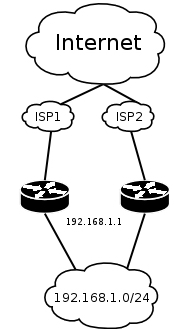
This example shows how to configure VRRP on the two routers shown on the diagram. The routers must have initial configuration: interfaces are enabled, each interface have appropriate IP address (note that each of the two interfaces should have an IP address), routing table is set correctly (it should have at least a default route). SRC-NAT or masquerading should also be configured before. See the respective manual chapters on how to make this configuration.
We will assume that the interface the 192.168.1.0/24 network is connected to is named local on both VRRP routers
Configuring Master VRRP router
First of all we should create a VRRP instance on this router. We will use the priority of 255 for this router as it should be preferred router.
[admin@MikroTik] interface vrrp> add interface=local priority=255
[admin@MikroTik] interface vrrp> print
Flags: X - disabled, I - invalid, R - running, M - master, B - backup
 0   RM name="vrrp1" mtu=1500 mac-address=00:00:5E:00:01:01 arp=enabled
        interface=local vrid=1 priority=255 interval=1 preemption-mode=yes
        authentication=none password="" on-backup="" on-master=""
[admin@MikroTik] interface vrrp>
Next the IP address should be added to this VRRP instance
[admin@MikroTik] ip address> add address=192.168.1.1/24 interface=vrrp1
[admin@MikroTik] ip address> print
Flags: X - disabled, I - invalid, D - dynamic
  #   ADDRESS            NETWORK         BROADCAST       INTERFACE
  0   10.0.0.1/24        10.0.0.0        10.0.0.255      public
  1   192.168.1.2/24     192.168.1.0     192.168.1.255   local
  2   192.168.1.1/24     192.168.1.0     192.168.1.255   vrrp1
[admin@MikroTik] ip address>
Configuring Backup VRRP router
Now we will create VRRP instance with lower priority (we can use the default value of 100), so this router will back up the preferred one:
[admin@MikroTik] interface vrrp> add interface=local
[admin@MikroTik] ip vrrp> print
Flags: X - disabled, I - invalid, R - running, M - master, B - backup
 0    B name="vrrp1" mtu=1500 mac-address=00:00:5E:00:01:01 arp=enabled
        interface=local vrid=1 priority=100 interval=1 preemption-mode=yes
        authentication=none password="" on-backup="" on-master=""
[admin@MikroTik] interface vrrp>
Now we should add the same address as was added to the master node:
[admin@MikroTik] ip address> add address=192.168.1.1/24 interface=vrrp1
Testing fail over
Now, when we will disconnect the master router, the backup one will switch to the master state after a few seconds:
[admin@MikroTik] interface vrrp> print
Flags: X - disabled, I - invalid, R - running, M - master, B - backup
 0   RM name="vrrp1" mtu=1500 mac-address=00:00:5E:00:01:01 arp=enabled
        interface=local vrid=1 priority=100 interval=1 preemption-mode=yes
        authentication=none password="" on-backup="" on-master=""
[admin@MikroTik] interface vrrp>