
RadioLAN 5.8GHz Wireless Interface
| Document revision: | 1.1 (Fri Mar 05 08:17:04 GMT 2004) |
| Applies to: | V2.9 |
General Information
Summary
The MikroTik RouterOS supports the following RadioLAN 5.8GHz Wireless Adapter hardware:
- RadioLAN ISA card (Model 101)
- RadioLAN PCMCIA card
For more information about the RadioLAN adapter hardware please see the relevant User???s Guides and Technical Reference Manuals.
Specifications
Packages required: radiolanLicense required: Level4
Submenu level: /interface radiolan
Hardware usage: Not significant
Related Documents
Description
Installing the Wireless AdapterThese installation instructions apply to non-Plug-and-Play ISA cards. If You have a Plug-and-Play compliant system AND PnP OS Installed option in system BIOS is set to Yes AND you have a Plug-and-Play compliant ISA or PCI card (using PCMCIA or CardBus card with Plug-and-Play compliant adapter), the driver should be loaded automatically. If it is not, these instructions may also apply to your system.
The basic installation steps of the wireless adapter should be as follows:
- Check the system BIOS settings for peripheral devices, like, Parallel or Serial communication ports. Disable them, if you plan to use IRQ's assigned to them by the BIOS.
- Use the RLProg.exe to set the IRQ and Base Port address of the RadioLAN ISA card (Model 101). RLProg must not be run from a DOS window. Use a separate computer or a bootable floppy to run the RLProg utility and set the hardware parameters. The factory default values of I/O 0x300 and IRQ 10 might conflict with other devices.
Please note, that not all combinations of I/O base addresses and IRQs may work on your motherboard. As it has been observed, the IRQ 5 and I/O 0x300 work in most cases.
Wireless Interface Configuration
Submenu level: /interface ratiolanDescription
To set the wireless interface for working with another wireless card in a point-to-point link, you should set the following parameters:
- The Service Set Identifier. It should match the sid of the other card.
- The Distance should be set to that of the link. For example, if you have 6 km link, use distance 4.7 km - 6.6 km.
All other parameters can be left as default. You can monitor the list of neighbors having the same sid and being within the radio range.
Property Description
name (name; default: radiolanN) - assigned interface name mtu (integer; default: 1500) - Maximum Transmission Unit mac-address (read-only: MAC address) - MAC address distance (0-150m | 10.2km-13.0km | 2.0km-2.9km | 4.7km-6.6km | 1.1km-2.0km | 150m-1.1km | 2.9km-4.7km | 6.6km-10.2km; default: 0-150m) - distance setting for the link rx-diversity (enabled | disabled; default: disabled) - receive diversity tx-diversity (enabled | disabled; default: disabled) - transmit diversity default-destination (ap | as-specified | first-ap | first-client | no-destination; default: first-client) - default destination. It sets the destination where to send the packet if it is not for a client in the radio network default-address (MAC address; default: 00:00:00:00:00:00) - MAC address of a host in the radio network where to send the packet, if it is for none of the radio clients max-retries (integer; default: 1500) - maximum retries before dropping the packet sid (text) - Service Identifier card-name (text) - card name arp (disabled | enabled | proxy-arp | reply-only; default: enabled) - Address Resolution Protocol, one of the:enabled - the interface will use ARP protocol
proxy-arp - the interface will be an ARP proxy (see corresponding manual)
reply-only - the interface will only reply to the requests originated to its own IP addresses, but neighbor MAC addresses will be gathered from /ip arp statically set table only.
Example
[admin@MikroTik] interface radiolan> print
Flags: X - disabled, R - running
  0  R name="radiolan1" mtu=1500 mac-address=00:A0:D4:20:4B:E7 arp=enabled
       card-name="00A0D4204BE7" sid="bbbb" default-destination=first-client
       default-address=00:00:00:00:00:00 distance=0-150m max-retries=15
       tx-diversity=disabled rx-diversity=disabled


[admin@MikroTik] interface radiolan>
You can monitor the status of the wireless interface:
[admin@MikroTik] interface radiolan> monitor radiolan1
    default: 00:00:00:00:00:00
      valid: no

[admin@MikroTik] interface radiolan>
Here, the wireless interface card has not found any neighbor.
[admin@MikroTik] interface radiolan> set 0 sid ba72 distance 4.7km-6.6km
[admin@MikroTik] interface radiolan> print
Flags: X - disabled, R - running
  0  R name="radiolan1" mtu=1500 mac-address=00:A0:D4:20:4B:E7 arp=enabled
       card-name="00A0D4204BE7" sid="ba72" default-destination=first-client
       default-address=00:00:00:00:00:00 distance=4.7km-6.6km max-retries=15
       tx-diversity=disabled rx-diversity=disabled

[admin@MikroTik] interface radiolan> monitor 0
    default: 00:A0:D4:20:3B:7F
      valid: yes

[admin@MikroTik] interface radiolan>
Now we'll monitor other cards with the same sid within range:
[admin@MikroTik] interface radiolan> neighbor radiolan1 print
Flags: A - access-point, R - registered, U - registered-to-us,
D - our-default-destination
      NAME                 ADDRESS           ACCESS-POINT
    D 00A0D4203B7F         00:A0:D4:20:3B:7F
[admin@MikroTik] interface radiolan>
You can test the link by pinging the neighbor by its MAC address:
[admin@MikroTik] interface radiolan> ping 00:a0:d4:20:3b:7f radiolan1 \
\... size=1500 count=50
                 sent: 1
    successfully-sent: 1
          max-retries: 0
      average-retries: 0
          min-retries: 0

                 sent: 11
    successfully-sent: 11
          max-retries: 0
      average-retries: 0
          min-retries: 0

                 sent: 21
    successfully-sent: 21
          max-retries: 0
      average-retries: 0
          min-retries: 0

                 sent: 31
    successfully-sent: 31
          max-retries: 0
      average-retries: 0
          min-retries: 0

                 sent: 41
    successfully-sent: 41
          max-retries: 0
      average-retries: 0
          min-retries: 0

                 sent: 50
    successfully-sent: 50
          max-retries: 0
      average-retries: 0
          min-retries: 0

[admin@MikroTik] interface radiolan>
Troubleshooting
Description
-
The radiolan interface does not show up under the interfaces list
Obtain the required license for RadioLAN 5.8GHz wireless feature
-
The wireless card does not obtain the MAC address of the default destination
Check the cabling and antenna alignment
Wireless Network Applications
Point-to-Point Setup with Routing
Let us consider the following network setup:
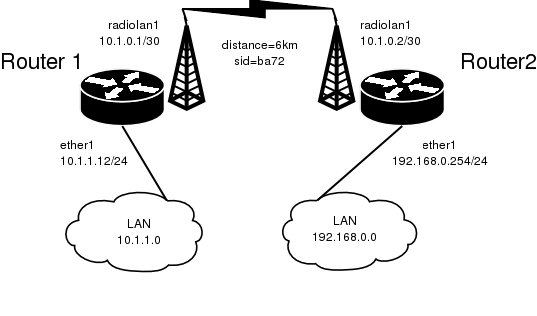
The minimum configuration required for the RadioLAN interfaces of both routers is:
- Setting the Service Set Identifier (up to alphanumeric characters). In our case we use SSID "ba72"
- Setting the distance parameter, in our case we have 6km link.
The IP addresses assigned to the wireless interface of Router#1 should be from the network 10.1.0.0/30, e.g.:
[admin@MikroTik] ip address> add address=10.1.0.1/30 interface=radiolan1
[admin@MikroTik] ip address> print
Flags: X - disabled, I - invalid, D - dynamic
  #   ADDRESS            NETWORK         BROADCAST       INTERFACE
  0   10.1.1.12/24       10.1.1.0        10.1.1.255      ether1
  1   10.1.0.1/30        10.1.0.0        10.1.0.3        radiolan1
[admin@MikroTik] ip address>
The default route should be set to the gateway router 10.1.1.254. A static route should be added for the network 192.168.0.0/24:
[admin@MikroTik] ip route> add gateway=10.1.1.254
comment  copy-from  disabled  distance  dst-address  netmask  preferred-source
[admin@MikroTik] ip route> add gateway=10.1.1.254 preferred-source=10.1.0.1
[admin@MikroTik] ip route> add dst-address=192.168.0.0/24 gateway=10.1.0.2 \
\... preferred-source=10.1.0.1
[admin@MikroTik] ip route> print
Flags: X - disabled, I - invalid, D - dynamic, J - rejected,
C - connect, S - static, R - rip, O - ospf, B - bgp
    #    DST-ADDRESS        G GATEWAY         DISTANCE INTERFACE
    0  S 0.0.0.0/0          u 10.1.1.254      1        radiolan1
    1  S 192.168.0.0/24     r 10.1.0.2        1        radiolan1
    2 DC 10.1.0.0/30        r 0.0.0.0         0        radiolan1
    3 DC 10.1.1.0/24        r 0.0.0.0         0        ether1
[admin@MikroTik] ip route>
The Router#2 should have addresses 10.1.0.2/30 and 192.168.0.254/24 assigned to the radiolan and Ethernet interfaces respectively. The default route should be set to 10.1.0.1