All other parameters can be left as default. However, you should make sure, that all clients support the basic rate of your access point, i.e., the supported-rates of the client should cove the basic-rates of the access point.
Example
To configure the wireless interface prism1 for working as an access point with ssid testing and use the frequency 2442MHz:
[admin@MikroTik] interface prism> set prism1 mode=ap-bridge frequency=2442MHz \
\... ssid=testing
[admin@MikroTik] interface prism> print
Flags: X - disabled, R - running
  0  R name="prism1" mtu=1500 mac-address=00:90:4B:02:17:E2 arp=enabled
       mode=ap-bridge root-ap=00:00:00:00:00:00 frequency=2442MHz ssid="testing"
       default-authentication=yes default-forwarding=yes max-clients=2007
       card-type=generic tx-power=auto supported-rates=1-11 basic-rates=1
       hide-ssid=no

[admin@MikroTik] interface prism>
Registering the Access Point to another Access Point
Description
You can configure the access point to registering to another (root) access point by specifying the MAC address of the root access point.The 'non-root' access point will register the clients only if it is registered to the 'root' access point.
Having one access point registered to another one enables bridging the networks, if bridging mode between prism and ethernet interfaces is used. Note, that in the station mode, bridging cannot be used between prism and ethernet interfaces.
Important! Prism 2.5 200mW cards require firmware 1.3.6 or lower, if you want to bridge networks. Please see the troubleshooting section on how to check the firmware version and downgrade it.
Example
To configure the wireless interface prism1 to register to the 00:90:4B:02:17:E2 root access point:
[admin@MikroTik] interface prism> set prism1 root-ap=00:90:4B:03:F1:71
[admin@MikroTik] interface prism> print
Flags: X - disabled, R - running
  0  R name="prism1" mtu=1500 mac-address=00:90:4B:02:17:E2 arp=enabled
       mode=ap-bridge root-ap=00:90:4B:03:F1:71 frequency=2442MHz ssid="testing"
       default-authentication=yes default-forwarding=yes max-clients=2007
       card-type=generic tx-power=auto supported-rates=1-11 basic-rates=1
       hide-ssid=no

[admin@MikroTik] interface prism>
Wireless Network Applications
Wireless Client
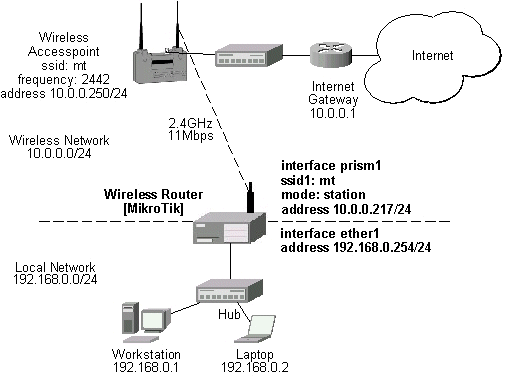
Let us consider the following point-to-multipoint network setup with CISCO/Aironet Wireless Access Point as a base station and MikroTik Wireless Router as a client:
3rd Party Wireless AP Configuration
The access point is connected to the wired network's HUB and has IP address from the network 10.0.0.0/24. The minimum configuration required for the AP is:- Setting the Service Set Identifier (up to 32 alphanumeric characters). In our case we use ssid "mt".
- Setting the allowed data rates at 1-11Mbps, and the basic rate at 1Mbps.
- Choosing the frequency, in our case we use 2442MHz.
- Setting the identity parameters: ip address/mask and gateway. These are required if you want to access the AP remotely using telnet or http.
- If you use CISCO/Aironet Wireless Ethernet Bridge or Access Point, you should set the Configuration/Radio/I80211/Extended (Allow proprietary extensions) to off, and the Configuration/Radio/I80211/Extended/Encapsulation (Default encapsulation method) to RFC1042. If left to the default on and 802.1H, respectively, you won't be able to pass traffic through the bridge.
Note that the AP is not a router! It has just one network address, and is just like any host on the network. It resembles a wireless-to-Ethernet HUB or bridge. The AP does not route the IP traffic!
MikroTik RouterOS Wireless Client Configuration
The minimum configuration for the MikroTik router's prism wireless interface is:- Setting the Service Set Identifier to that of the AP, i.e., "mt"
- The Operation Mode should be station.
[admin@MikroTik] interface prism> set 0 ssid=mt
[admin@MikroTik] interface prism> print
Flags: X - disabled, R - running
  0  R name="prism1" mtu=1500 mac-address=00:02:6F:01:D2:7D arp=enabled
       mode=station root-ap=00:00:00:00:00:00 frequency=2412MHz ssid="mt"
       default-authentication=yes default-forwarding=yes max-clients=2007
       card-type=generic tx-power=auto supported-rates=1-11 basic-rates=1
       hide-ssid=no

[admin@MikroTik] interface prism> monitor 0
                      status: connected-to-ess
                   data-rate: 11Mbps
                        ssid: "mt"
                       bssid: 00:40:96:56:E2:AD
              signal-quality: 78
                signal-level: 125
                 noise-level: -99

[admin@MikroTik] interface prism>
The IP addresses assigned to the wireless interface should be from the network 10.0.0.0/24, e.g.:
[admin@MikroTik] ip address> add address=10.0.0.217/24 interface=prism1
[admin@MikroTik] ip address> print
Flags: X - disabled, I - invalid, D - dynamic
  #   ADDRESS            NETWORK         BROADCAST       INTERFACE
  0   10.0.0.217/24      10.0.0.0        10.0.0.255      prism1
  1   192.168.0.254/24   192.168.0.254   192.168.0.254   ether1
[MikroTik] ip address>
The default route should be set to the gateway router 10.0.0.1 (not to the AP 10.1.1.250 !):
[admin@MikroTik] ip route> add gateway=10.0.0.1
[admin@MikroTik] ip route> print
Flags: X - disabled, I - invalid, D - dynamic, J - rejected,
C - connect, S - static, R - rip, O - ospf, B - bgp
    #    DST-ADDRESS        G GATEWAY         DISTANCE INTERFACE
    0  S 0.0.0.0/0          r 10.0.0.1        1        prism1
    1 DC 10.0.0.0/24        r 0.0.0.0         0        prism1
    2 DC 192.168.0.0/24     r 0.0.0.0         0        ether1
[admin@MikroTik] interface prism>
Note! You cannot use the bridging function between the prism and ethernet interfaces, if the prism interface is in the station mode. The bridge does not work in this case!
Wireless Access Point
Let us consider the following point-to-point wireless network setup with two MikroTik Wireless Routers:
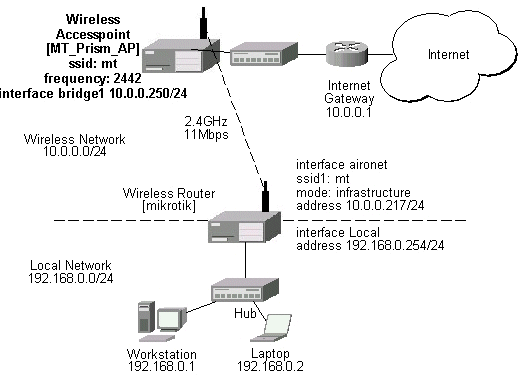
You need both the 2.4GHz Wireless and the Prism AP Feature Licenses to enable the AP mode. To make the MikroTik router work as an access point, the configuration of the prism wireless interface should be as follows:
- A unique Service Set Identificator should be chosen, say "mt"
- A frequency should be selected for the link, say 2442MHz
- The operation mode should be set to ap-bridge or bridge.
[admin@MT_Prism_AP] interface prism> set 0 mode=ap-bridge frequency=2442MHz \
\... ssid=mt
[admin@MT_Prism_AP] interface prism> print
Flags: X - disabled, R - running
  0  R name="prism1" mtu=1500 mac-address=00:90:4B:02:17:E2 arp=enabled
       mode=ap-bridge root-ap=00:00:00:00:00:00 frequency=2442MHz ssid="mt"
       default-authentication=yes default-forwarding=yes max-clients=2007
       card-type=generic tx-power=auto supported-rates=1-11 basic-rates=1
       hide-ssid=no

[admin@MT_Prism_AP] interface prism> monitor 0
           current-sta-count: 2
            current-ap-count: 0
         current-local-count: 0
    current-forwarding-count: 0

[admin@MT_Prism_AP] interface prism>
The list of registered clients looks like follows:
[admin@MT_Prism_AP] interface prism> registration-table print
  # INTERFACE                     MAC-ADDRESS       TYPE      PARENT
  0 prism1                        00:07:EB:30:E7:DA client
  1 prism1                        00:02:6F:01:5D:FE client
[admin@MT_Prism_AP] interface prism>
There are two possible ways of implementing the wireless access point feature:
- Use it as a pure access point with bridging function enabled between the ethernet and prism interfaces. The IP address can be assigned to the bridge interface.
- Use it as a wireless access point router with routing functionality between the ethernet and prism interfaces. It requires different IP addresses assigned to both the Ethernet and prism interfaces. The addresses should be from different networks as well!
- Add bridge interface with the desired forwarded protocols:
[admin@MT_Prism_AP] interface bridge> add forward-protocols=ip,arp,other [admin@MT_Prism_AP] interface bridge> print Flags: X - disabled, R - running 0 X name="bridge1" mtu=1500 arp=enabled mac-address=00:00:00:00:00:00 forward-protocols=ip,arp,other priority=1 [admin@MT_Prism_AP] interface bridge> - Add the desired interfaces to the bridge interface:
[admin@MT_Prism_AP] interface bridge port> set "ether1,prism1" bridge=bridge1
[admin@MT_Prism_AP] interface bridge port> print
Flags: X - disabled
  #   INTERFACE                            BRIDGE
  0   ether1                               bridge1
  1   prism1                               bridge1
[admin@MT_Prism_AP] interface bridge port>
- Enable the bridge interface:
[admin@MT_Prism_AP] interface> print
Flags: X - disabled, D - dynamic, R - running
  #    NAME                 TYPE             MTU
  0  R ether1               ether            1500
  1  R prism1               prism            1500
  2 X  bridge1              bridge           1500
[admin@MT_Prism_AP] interface> enable bridge1
[admin@MT_Prism_AP] interface> print
Flags: X - disabled, D - dynamic, R - running
  #    NAME                 TYPE             MTU
  0  R ether1               ether            1500
  1  R prism1               prism            1500
  2  R  bridge1              bridge           1500
[admin@MT_Prism_AP] interface>
- Assign an IP address to the bridge interface and specify the default gateway for the access point:
[admin@MT_Prism_AP] ip address> add address=10.0.0.250/24 interface=bridge1
[admin@MT_Prism_AP] ip address> print
Flags: X - disabled, I - invalid, D - dynamic
  #   ADDRESS            NETWORK         BROADCAST       INTERFACE
  0   10.0.0.250/24      10.0.0.0        10.0.0.255      bridge1
[admin@MT_Prism_AP] ip address> .. route add gateway=10.0.0.1
[admin@MT_Prism_AP] ip address> .. route print
Flags: X - disabled, I - invalid, D - dynamic, J - rejected,
C - connect, S - static, R - rip, O - ospf, B - bgp
    #    DST-ADDRESS        G GATEWAY         DISTANCE INTERFACE
    0  S 0.0.0.0/0          r 10.0.0.1        1        bridge1
    1 DC 10.0.0.0/24        r 0.0.0.0         0        bridge1
[admin@MT_Prism_AP] ip address>
The client router requires the System Service Identificator set to "mt". The IP addresses assigned to the interfaces should be from networks 10.0.0.0/24 and 192.168.0.0./24:
[admin@mikrotik] ip address> print
Flags: X - disabled, I - invalid, D - dynamic
  #   ADDRESS            NETWORK         BROADCAST       INTERFACE
  0   10.0.0.217/24      10.0.0.0        10.0.0.255      aironet
  1   192.168.0.254/24   192.168.0.0     192.168.0.255   Local
[admin@mikrotik] ip address>
The default route should be set to gateway 10.0.0.1 for the router [mikrotik]:
[admin@mikrotik] ip route> add gateway=10.0.0.1
[admin@mikrotik] ip route> print
Flags: X - disabled, I - invalid, D - dynamic, J - rejected,
C - connect, S - static, R - rip, O - ospf, B - bgp
    #    DST-ADDRESS        G GATEWAY         DISTANCE INTERFACE
    0  S 0.0.0.0/0          r 10.0.0.1        1        aironet
    1 DC 10.0.0.0/24        r 0.0.0.0         0        aironet
    2 DC 192.168.0.254/24   r 0.0.0.0         0        Local
[admin@mikrotik] ip route>
Wireless Bridge
To set up a wireless bridge between two networks, you need to have a "wireless 2.4GHz" or "AP" license. Configure one MikroTik RouterOS Prism AP to register to another MikroTik RouterOS Prism AP for point-to-point operation.
Important! Prism 2.5 200mW cards require firmware 1.3.6 or lower, if you want to bridge networks. Please see the troubleshooting section on how to check the firmware version and downgrade it.
The basic setup is as follows:
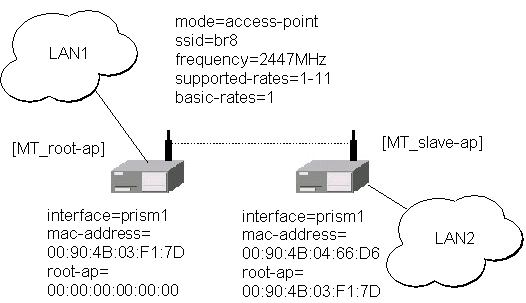
Below are step-by-step configurations for both units. The system identities are set to [MT-parent] and [MT-child], respectively.
[MT-parent] Configuration
Assume you have interfaces ether1 and prism1 under /interface list.- Enable the Ethernet interface ether1:
/interface enable ether1
- Configure prism1 interface.
Set mode=bridge, ssid=br8, frequency=2447MHz, and enable prism1 interface (you can use mode=ap-bridge, if you have Prism AP License):/interface prism set prism1 mode=bridge ssid=br8 frequency=2447 disabled=no
- Add bridge interface and specify forwarded protocol list:
/interface bridge add forward-protocols=ip,arp,other disabled=no
- Specify ports prism1 and ether1 that belong to bridge1:
/interface bridge port set ether1,prism1 bridge=bridge1
- Assign IP address 10.0.0.217/24 to the bridge1 interface:
/ip address add address=10.0.0.217/24 interface=bridge1
- Set default route to 10.0.0.1:
/ip route add gw=10.0.0.1
[MT-child] Configuration
Assume you have interfaces ether1 and prism1 under /interface list.- Enable the Ethernet interface ether1:
/interface enable ether1
- Configure prism1 interface.
Here, you have to specify root-ap MAC address, so the Prism radio registers to the root AP.
Set mode=bridge, ssid=br8, frequency=2447MHz, root-ap=xx:xx:xx:xx:xx:xx, and enable prism1 interface (you can use mode=ap-bridge, if you have Prism AP License):/interface prism set prism1 mode=bridge ssid=br8 frequency=2447 \ root-ap=xx:xx:xx:xx:xx:xx disabled=no
Here, substitute the xx:xx:xx:xx:xx:xx with MAC address of [MT-parent] prism interface.
- Check your setup and see, if you have successfully registered to the root AP.
Its MAC address should be listed as parent-ap in the registration table
of prism interface, for example:
[admin@MT-child] interface prism> registration-table print
  # INTERFACE                     MAC-ADDRESS       TYPE      PARENT
  0 prism1                        00:02:6F:01:CE:2A parent-ap
[admin@MT-child] interface prism>
- Add bridge interface and specify forwarded protocol list:
/interface bridge add forward-protocols=ip,arp,other disabled=no
- Specify ports prism1 and ether1 that belong to bridge1:
/interface bridge port set ether1,prism1 bridge=bridge1
- Assign IP address 10.0.0.218/24 to the bridge1 interface:
/ip address add address=10.0.0.218/24 interface=bridge1
- Set default route to 10.0.0.1:
/ip route add gw=10.0.0.1
Note, that both LANs should use IP addresses from the same network 10.0.0.0/24. Both MikroTik routers belong to the same network too. You should be able to ping through the wireless bridge from one LAN to other and to gateway 10.0.0.1.
© Copyright 1999-2003, MikroTik