For more information about the MOXA C502 Dual-port Synchronous 8Mb/s Adapter hardware please see the relevant documentation:
[admin@MikroTik] > sys package print
Flags: I - invalid
  #   NAME                  VERSION              BUILD-TIME           UNINSTALL
  0   system                2.6beta4             aug/09/2002 20:22:14 no
  1   ppp                   2.6beta4             aug/09/2002 20:28:01 no
  2   moxa-c502             2.6beta4             aug/09/2002 20:53:57 no
  3   pppoe                 2.6beta4             aug/09/2002 20:29:18 no
  4   pptp                  2.6beta4             aug/09/2002 20:28:43 no
  5   ssh                   2.6beta4             aug/09/2002 20:25:31 no
  6   advanced-tools        2.6beta4             aug/09/2002 20:53:37 no
  7   cyclades              2.6beta4             aug/09/2002 20:52:00 no
  8   framerelay            2.6beta4             aug/09/2002 20:52:09 no
[admin@MikroTik] >
[admin@MikroTik] > system resource irq print
Flags: U - unused
   IRQ OWNER
   1   keyboard
   2   APIC
 U 3
   4   serial port
 U 5
 U 6
 U 7
 U 8
   9   ether1
 U 10
   11  ether2
 U 12
 U 13
   14  IDE 1
[admin@MikroTik] >
[admin@MikroTik] > /driver print
Flags: I - invalid, D - dynamic
  #   DRIVER                                IRQ IO       MEMORY   ISDN-PROTOCOL
  0 D Moxa C502 PCI
  1 D RealTek 8139
[admin@MikroTik] >
[admin@MikroTik] > interface print
Flags: X - disabled, D - dynamic, R - running
  #    NAME                 TYPE             MTU
  0  R ether1               ether            1500
  1 X  ether2               ether            1500
  2 X  ether3               ether            1500
  3 X  moxa1                moxa             1500
  4 X  moxa2                moxa             1500

[admin@MikroTik] > interface
[admin@MikroTik] interface> set 3 name moxa
[admin@MikroTik] interface> enable moxa
[admin@MikroTik] interface> print
Flags: X - disabled, D - dynamic, R - running
  #    NAME                 TYPE             MTU
  0  R ether1               ether            1500
  1 X  ether2               ether            1500
  2 X  ether3               ether            1500
  3    moxa                 moxa             1500
  4 X  moxa2                moxa             1500

[admin@MikroTik] >
More configuration and statistics parameters can be found under the /interface moxa-c502 menu:
[admin@MikroTik] interface> moxa-c502
[admin@MikroTik] interface moxa-c502> print
Flags: X - disabled, R - running
  0 X  name="moxa1" mtu=1500 line-protocol=sync-ppp clock-rate=64000
       clock-source=external frame-relay-lmi-type=ansi frame-relay-dce=no
       cisco-hdlc-keepalive-interval=10s

  1 X  name="moxa2" mtu=1500 line-protocol=sync-ppp clock-rate=64000
       clock-source=external frame-relay-lmi-type=ansi frame-relay-dce=no
       cisco-hdlc-keepalive-interval=10s


[admin@MikroTik] interface moxa-c502>
Argument description:
numbers - Interface number in the list
cisco-hdlc-keepalive-interval - Keepalive period in seconds (0..32767)
clock-rate - Speed of internal clock
clock-source - Clock source (external, internal, tx-from-rx, tx-internal)
disabled - disable or enable the interface
frame-relay-dce - Operate in DCE mode (yes, no
frame-relay-lmi-type - Frame-Relay Local Management Interface type (ansi, ccitt)
line-protocol - Line protocol (cisco-hdlc, frame-relay, sync-ppp)
mtu - Maximum Transmit Unit (68...1500 bytes). Default value is 1500 bytes.
name - New interface name
You can monitor the status of the synchronous interface:
[admin@MikroTik] interface moxa-c502> monitor 0
    dtr: yes
    rts: yes
    cts: no
    dsr: no
    dcd: no

[admin@MikroTik] interface moxa-c502>
Connect a communication device, e.g., a baseband modem, to the V.35 port and turn it on. If the link is working properly the status of the interface is:
[admin@MikroTik] interface moxa-c502> monitor 0
    dtr: yes
    rts: yes
    cts: yes
    dsr: yes
    dcd: yes

[admin@MikroTik] interface moxa-c502>
The MikroTik driver for the MOXA C502 Dual-port Synchronous adapter allows you to unplug the V.35 cable from one modem and plug it into another modem with a different clock speed, and you do not need to restart the interface or router.
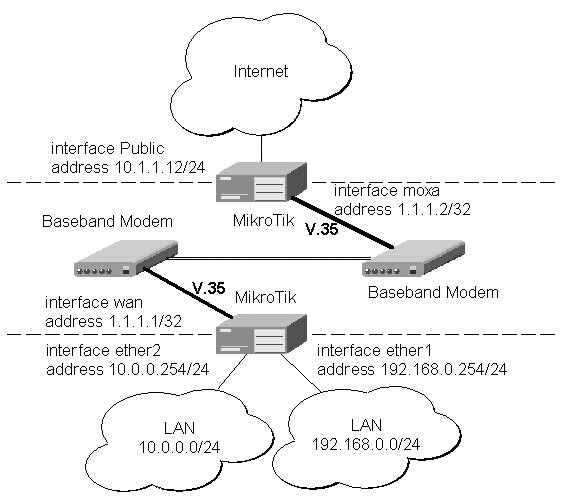
Two possible synchronous line configurations are discussed in the following examples:
The driver for MOXA C502 card should be loaded and the interface should be enabled according to the instructions given above. The IP addresses assigned to the synchronous interface should be as follows:
[admin@MikroTik] ip address> add address 1.1.1.1/32 interface wan \
\... network 1.1.1.2 broadcast 255.255.255.255

[admin@MikroTik] ip address> print
Flags: X - disabled, I - invalid, D - dynamic
  #   ADDRESS            NETWORK         BROADCAST       INTERFACE
  0   10.0.0.254/24      10.0.0.254      10.0.0.255      ether2
  1   192.168.0.254/24   192.168.0.254   192.168.0.255   ether1
  2   1.1.1.1/32         1.1.1.2         255.255.255.255 wan
[admin@MikroTik] ip address> /ping 1.1.1.2
1.1.1.2 64 byte pong: ttl=255 time=31 ms
1.1.1.2 64 byte pong: ttl=255 time=26 ms
1.1.1.2 64 byte pong: ttl=255 time=26 ms
3 packets transmitted, 3 packets received, 0% packet loss
round-trip min/avg/max = 26/27.6/31 ms
[admin@MikroTik] ip address>
Note, that for the point-to-point link the network mask is set to 32 bits, the argument network is set to the IP address of the other end, and the broadcast address is set to 255.255.255.255. The default route should be set to the gateway router 1.1.1.2:
[admin@MikroTik] ip route> add gateway 1.1.1.2 interface wan
[admin@MikroTik] ip route> print
Flags: X - disabled, I - invalid, D - dynamic, J - rejected,
C - connect, S - static, R - rip, O - ospf, B - bgp
    #    DST-ADDRESS        G GATEWAY         DISTANCE INTERFACE
    0  S 0.0.0.0/0          r 1.1.1.2         1        wan
    1 DC 10.0.0.0/24        r 10.0.0.254      1        ether2
    2 DC 192.168.0.0/24     r 192.168.0.254   0        ether1
    3 DC 1.1.1.2/32         r 0.0.0.0         0        wan

[admin@MikroTik] ip route>
The configuration of the Mikrotik router at the other end is similar:
[admin@MikroTik] ip address> add address 1.1.1.2/32 interface moxa \
\... network 1.1.1.1 broadcast 255.255.255.255
[admin@MikroTik] ip address> print
Flags: X - disabled, I - invalid, D - dynamic
  #   ADDRESS            NETWORK         BROADCAST       INTERFACE
  0   10.1.1.12/24       10.1.1.12       10.1.1.255      Public
  1   1.1.1.2/32         1.1.1.1         255.255.255.255 moxa
[admin@MikroTik] ip address> /ping 1.1.1.1
1.1.1.1 64 byte pong: ttl=255 time=31 ms
1.1.1.1 64 byte pong: ttl=255 time=26 ms
1.1.1.1 64 byte pong: ttl=255 time=26 ms
3 packets transmitted, 3 packets received, 0% packet loss
round-trip min/avg/max = 26/27.6/31 ms
[admin@MikroTik] ip address>
MikroTik Router to CISCO Router
Let us consider the following network setup with MikroTik Router connected to a leased line
with baseband modems and a CISCO router at the other end:
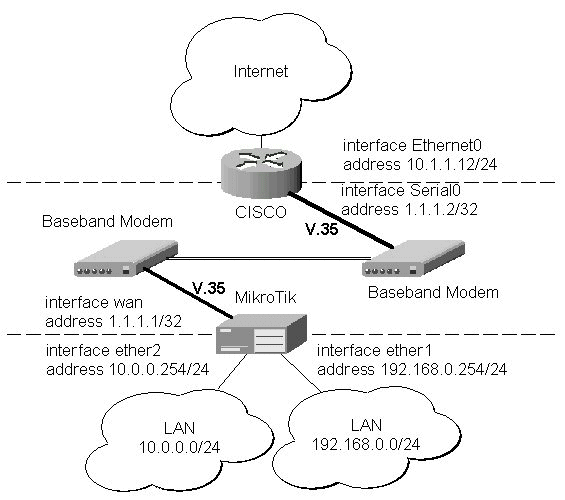
The driver for MOXA C502 card should be loaded and the interface should be enabled according to the instructions given above. The IP addresses assigned to the synchronous interface should be as follows:
[admin@MikroTik] ip address> add address 1.1.1.1/32 interface wan \
\... network 1.1.1.2 broadcast 255.255.255.255
[admin@MikroTik] ip address> print
Flags: X - disabled, I - invalid, D - dynamic
  #   ADDRESS            NETWORK         BROADCAST       INTERFACE
  0   10.0.0.254/24      10.0.0.254      10.0.0.255      ether2
  1   192.168.0.254/24   192.168.0.254   192.168.0.255   ether1
  2   1.1.1.1/32         1.1.1.2         255.255.255.255 wan
[admin@MikroTik] ip address> /ping 1.1.1.2
1.1.1.2 64 byte pong: ttl=255 time=31 ms
1.1.1.2 64 byte pong: ttl=255 time=26 ms
1.1.1.2 64 byte pong: ttl=255 time=26 ms
3 packets transmitted, 3 packets received, 0% packet loss
round-trip min/avg/max = 26/27.6/31 ms
[admin@MikroTik] ip address>
Note, that for the point-to-point link the network mask is set to 32 bits, the argument network is set to the IP address of the other end, and the broadcast address is set to 255.255.255.255. The default route should be set to the gateway router 1.1.1.2:
[admin@MikroTik] ip route> add gateway 1.1.1.2 interface wan
[admin@MikroTik] ip route> print
Flags: X - disabled, I - invalid, D - dynamic, J - rejected,
C - connect, S - static, R - rip, O - ospf, B - bgp
    #    DST-ADDRESS        G GATEWAY         DISTANCE INTERFACE
    0  S 0.0.0.0/0          r 1.1.1.2         1        wan
    1 DC 10.0.0.0/24        r 10.0.0.254      0        ether2
    2 DC 192.168.0.0/24     r 192.168.0.254   0        ether1
    3 DC 1.1.1.2/32         r 1.1.1.1         0        wan

[admin@MikroTik] ip route>
The configuration of the CISCO router at the other end (part of the configuration) is:
CISCO#show running-config
Building configuration...

Current configuration:
...
!
interface Ethernet0
 description connected to EthernetLAN
 ip address 10.1.1.12 255.255.255.0
!
interface Serial0
 description connected to MikroTik
 ip address 1.1.1.2 255.255.255.252
 serial restart-delay 1
!
ip classless
ip route 0.0.0.0 0.0.0.0 10.1.1.254
!
...
end

CISCO#
Send ping packets to the MikroTik router:
CISCO#ping 1.1.1.1

Type escape sequence to abort.
Sending 5, 100-byte ICMP Echos to 1.1.1.1, timeout is 2 seconds:
!!!!!
Success rate is 100 percent (5/5), round-trip min/avg/max = 28/32/40 ms
CISCO#