Features include:
[admin@MikroTik] interface bridge>
Bridge interface is accessible through any interface with bridging
functionality enabled.

     print  Show bridge interfaces
       get  get value of item's property
      find  Find interfaces
       set  Change bridge interface settings
    enable  Enable interface
   disable  Disable interface
       add  create new item
    remove  remove item
    export  Export bridge interfaces settings
      port  Interface settings
      host
  firewall
[admin@MikroTik] interface bridge> print
Flags: X - disabled, R - running
  0  R name="bridge1" mtu=1500 arp=enabled mac-address=00:50:08:00:00:F5
       forward-protocols=ip,arp,appletalk,ipx,ipv6,other priority=1

  1 X  name="bridge2" mtu=1500 arp=enabled mac-address=00:50:08:00:00:F7
       forward-protocols=appletalk,ipx,ipv6,other priority=1


[admin@MikroTik] interface bridge>
Argument description:
name - descriptive name of interface, default is bridgeX, X=1,2,...Note that forwarded-protocols is a simple filter that also affects the locally-destined and locally-originated packets. So disabling ip protocol you will not be able to communicate with the router from the bridged interfaces.
mtu - maximum transmit unit in bytes (68...1500, default 1500)
arp - Address Resolution Protocol setting, one of the:mac-address - MAC address for the interface, cannot be changed
- disabled - the interface will not use ARP protocol
- enabled - the interface will use ARP protocol
- proxy-arp - the interface will be an ARP proxy (see corresponding manual)
- reply-only - the interface will only reply to the requests originated to its own IP addresses, and not add dynamic entries to the arp table. If required, MAC addresses need to be added as static entries under /ip arp neighbor
forward-protocols - list of forwarded protocols. 'Other' means all other protocols than appletalk, arp, ip, ipv6, or ipx, e.g., netbeui, vlan, etc.
priority - bridge interface priority (0...65535, default 1). The priority argument is used by Spanning Tree Protocol to determine, which port remains enabled if two ports form a loop.
Bridge interface should be enabled and ports specified which belong to it.
[admin@MikroTik] interface bridge port> print
Flags: X - disabled
  #   INTERFACE                            BRIDGE
  0   ether1                               bridge1
  1   ether2                               bridge1
  2   ether3                               bridge2
  3   prism1                               bridge2
[admin@MikroTik] interface bridge port>
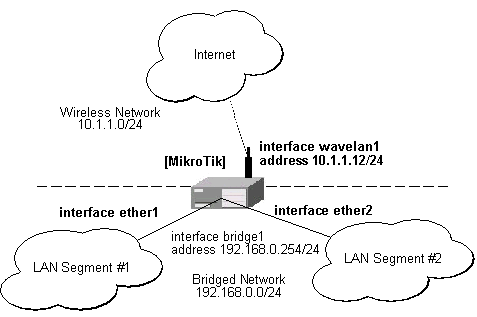
Assume we want to enable bridging between two Ethernet LAN segments and have the MikroTik router be the default gateway for them:
When configuring the MikroTik router for bridging you should do the following:
When configuring the bridge settings, each protocol that should be forwarded should be added to the forward-protocols list. The other protocol includes all protocols not listed before (as VLAN).
[admin@MikroTik] interface bridge> add forward-protocols=ip,arp,other
[admin@MikroTik] interface bridge> print
Flags: X - disabled, R - running
  0 X  name="bridge1" mtu=1500 arp=enabled mac-address=00:00:00:00:00:00
       forward-protocols=ip,arp,other priority=1

[admin@MikroTik] interface bridge>
The priority argument is used by the Spanning Tree Protocol to determine, which port remains enabled if two ports form a loop.
Next, each interface that should be included in the bridging port table:
[admin@MikroTik] interface bridge port> print
Flags: X - disabled
  #   INTERFACE                            BRIDGE
  0   ether1                               none
  1   ether2                               none
  2   ether3                               none
  3   wavelan1                             none
[admin@MikroTik] interface bridge port> set "0,1" bridge=bridge1
[admin@MikroTik] interface bridge port> print
Flags: X - disabled
  #   INTERFACE                            BRIDGE
  0   ether1                               bridge1
  1   ether2                               bridge1
  2   ether3                               none
  3   wavelan1                             none
[admin@MikroTik] interface bridge port>
After setting some interface for bridging, the bridge interface should be enabled in order to start using it:
[admin@MikroTik] interface bridge> print
Flags: X - disabled, R - running
  0 X  name="bridge1" mtu=1500 arp=enabled mac-address=00:50:08:00:00:F5
       forward-protocols=ip,arp,other priority=1

[admin@MikroTik] interface bridge> enable 0
[admin@MikroTik] interface bridge> print
Flags: X - disabled, R - running
  0  R name="bridge1" mtu=1500 arp=enabled mac-address=00:50:08:00:00:F5
       forward-protocols=ip,arp,other priority=1

[admin@MikroTik] interface bridge>
If you want to access the router through unnumbered bridged interfaces, it is required to add an IP address to a bridge interface:
[admin@MikroTik] ip address> add address=192.168.0.254/24 interface=bridge1
[admin@MikroTik] ip address> add address=10.1.1.12/24 interface=wavelan1
[admin@MikroTik] ip address> print
Flags: X - disabled, I - invalid, D - dynamic
  #   ADDRESS            NETWORK         BROADCAST       INTERFACE
  0   192.168.0.254/24   192.168.0.0     192.168.0.255   bridge1
  1   10.1.1.12/24       10.1.1.0        10.1.1.255      wavelan1
[admin@MikroTik] ip address>
Note!Assigning IP address to bridged interfaces 'ether1' or 'ether2' has no sense. Thus, when you assign some interface to a bridge, move its IP address to it at the same time!
Hosts on LAN segments #1 and #2 should use IP addresses from the same network 192.168.0.0/24 and have the default gateway set to 192.168.0.254 (MikroTik router).
Bridge Monitoring
The bridge can be monitored in real time.
The bridging table shows the MAC address of hosts,
interface which can forward packets to the host,
and the age of the information shown in seconds:
[admin@MikroTik] interface bridge host> print
Flags: L - local
   BRIDGE              MAC-ADDRESS       ON-INTERFACE       AGE
   bridge1             00:00:B4:5B:A6:58 ether1             4m48s
   bridge1             00:30:4F:18:58:17 ether1             4m50s
 L bridge1             00:50:08:00:00:F5 ether1             0s
 L bridge1             00:50:08:00:00:F6 ether2             0s
   bridge1             00:60:52:0B:B4:81 ether1             4m50s
   bridge1             00:C0:DF:07:5E:E6 ether1             4m46s
   bridge1             00:E0:C5:6E:23:25 ether2             4m48s
   bridge1             00:E0:F7:7F:0A:B8 ether1             1s
[admin@MikroTik] interface bridge host>
action - Action to undertake if the packet matches the rule (see below).
dst-address - Destination IP address. Can be in the form address/mask, where mask is number of nonzero bits in the subnet mask, e.g., 10.0.0.204/32
in-interface - interface the packet has entered the bridge through (may be all)
mac-dst-address - MAC address of destination host
mac-protocol - Either all or the MAC protocol number of the packet. Most widely used MAC protocol numbers are: 2048 for IP, 2054 for ARP, 32821 for RARP, 32823 for IPX, 32923 for AppleTalk (EtherTalk), 33011 for AppleTalk Address Resolution Protocol (AARP), 33169 for NetBEUI, 34525 for IPv6
mac-src-address - MAC address of source host
out-interface - interface the packet is leaving the bridge through (may be all)
protocol - Protocol (all, egp, ggp, icmp, igmp, ip-encap, ip-sec, tcp, udp)
src-address - Source IP address. Can be in the form address/mask, where mask is number of bits in the subnet, e.g., 10.0.0.201/32
If the packet matches the criteria of the rule, then the performed action can be:
Note that packets between bridged interfaces are also passed through the 'normal' /ip firewall rules, it even can be NATted. These rules can be used with real, physical receiving/transmitting interfaces, as well as with bridge interface that simply groups bridged interfaces.
More information about firewall-building can be found in Firewall Filters and Network Address Translation (NAT) manual.
http://users.pandora.be/bart.de.schuymer/ebtables/br_fw_ia/br_fw_ia.html