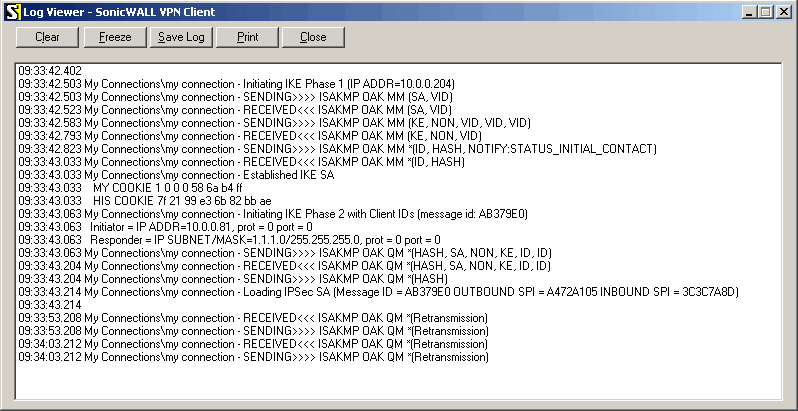
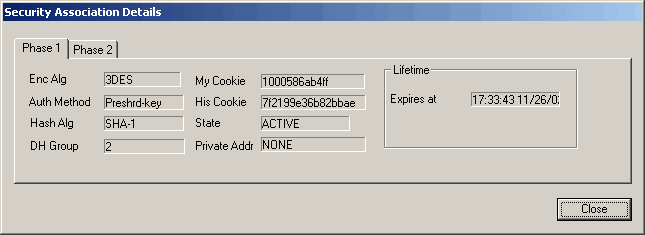
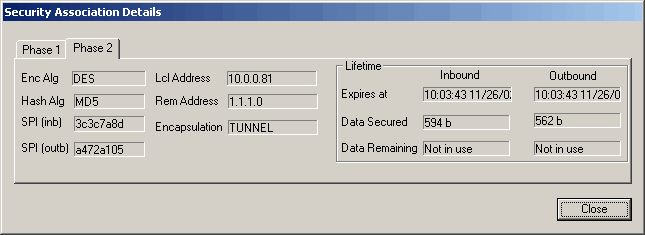
There are two lifetime values - soft and hard. When SA reaches it's soft lifetime, IKE daemon receives notice about it and starts another phase 2 exchange to replace this SA with fresh one. If SA reaches hard lifetime, it is discarded.
Perfect Forward Secrecy (PFS) that can optionally be provided by IKE is a property of key exchanges, which for IKE means that compromising the long term phase 1 key will not allow to easily gain access to all IPsec data that is protected by SAs established through this phase 1. It means an additional keying material is generated for each phase 2.
Generation of keying material is computationally very expensive. Use of modp8192 group can take several seconds even on very fast computer. It usually takes place once per phase 1 exchange, which happens only once between any host pair and then is kept for long time. PFS adds this expensive operation also to each phase 2 exchange.
IKE Traffic
To avoid problems with IKE packets hit some SPD rule and require to encrypt it with not yet established SA (that this packet perhaps is trying to establish), locally originated packets with UDP source port 500 are not processed with SPD. The same way packets with UDP destination port 500 that are to be delivered locally are not processed in incoming policy check.
[admin@MikroTik] ip ipsec>

             policy
       installed-sa
          manual-sa
               peer
  pre-shared-secret
           proposal
           counters
             export
[admin@MikroTik] ip ipsec>
Descriptions of settings:
policy - set up security policiesTo get IPsec to work with automatic keying you will have to configure policy, peer, pre-shared-secret and proposal entries. For manual keying you will have to configure policy and manual-sa entries.
installed-sa - look at currently installed security associations
manual-sa - templates for manual security associations
peer - IKE peer configuration
pre-shared-secret - to authenticate with IKE peers
proposal - phase2 IKE proposal settings
counters - counters
Policy Settings
To define new policy, use /ip ipsec policy add command:
[admin@MikroTik] ip ipsec policy> add sa-src-address=10.0.0.205 sa-dst-address=10.0.0.201 \
\... action=encrypt
[admin@MikroTik] ip ipsec policy> print
Flags: X - disabled, I - invalid
  0   src-address=10.0.0.205/32:any dst-address=10.0.0.201/32:any
      protocol=all action=encrypt level=require ipsec-protocols=esp tunnel=no
      sa-src-address=10.0.0.205 sa-dst-address=10.0.0.201 proposal=default
      manual-sa=none dont-fragment=clear


[admin@MikroTik] ip ipsec policy>
Argument description:
src-address - Source IP address. Can be in the form address/mask:portsIf you are using IKE to establish SAs automatically, then policies on both routers must be exactly matching, i.e. src-address=1.2.3.0/27 on one router and dst-address=1.2.3.0/28 on another won't work. src values on one router MUST be equal to dst values on the other one, and vice versa.
dst-address - Destination IP address. Can be in the form address/mask:ports
protocol - name or number of protocol action - What to do with packet that matches policy. Choices are:dont-fragment - default value works OK. It is good to have dont-fragment cleared because encrypted packets are always bigger than original and thus they may need fragmentation.
- accept - pass the packet. This is default action when no policies are configured.
- drop - drop the packet.
- encrypt - apply transormations specified by this policy and it's security associations.
tunnel - yes if you want to use tunnel mode. In tunnel mode all packets are IPIP encapsulated, and their new IP header src and dst are set to sa-src and sa-dst values of this policy. If you don't use tunnel mode (i.e. you use transport mode), then only packets whose source and destination is the same as sa-src and sa-dst can be processed by this policy. Transport mode can only work with packets that originate at and are destined for IPsec peers (hosts that established security associations). To encrypt traffic between networks (or network and host) you have to use tunnel mode.
ipsec-protocols - One of ah, esp, ah,esp. Specifies what combination of Authentication Header and Encapsulating Security Payload protocols you want to apply to matched traffic. AH is applied after ESP, and in case of tunnel mode ESP will be applied in tunnel mode and AH - in transport mode.
level - What to do if some of the SAs for this policy cannot be found:sa-src-address - SA source
- use - skip this transform, don't drop packet, don't acquire SA from IKE daemon.
- acquire - skip this transform, but acquire SA for it from IKE daemon.
- require - drop packet, acquire SA.
sa-dst-address - SA destination
manual-sa - Name of manual-sa template that will be used to create SAs for this policy, or none if you don't want to set up any manual keys.
proposal - Name of proposal info that will be sent by IKE daemon to establish SAs for this policy.
Statistics can be printed out using print stats command:
[admin@MikroTik] ip ipsec policy> print stats
Flags: X - disabled, I - invalid
  0   src-address=10.0.0.205/32:any dst-address=10.0.0.201/32:any
      protocol=all ph2-state=no-phase2 in-accepted=0 in-dropped=0
      out-accepted=0 out-dropped=0 encrypted=0 not-encrypted=0 decrypted=0
      not-decrypted=0


[admin@MikroTik] ip ipsec policy>
Description of the printout:
ph2-state - progress of key establishing. 'expired' means there are some leftovers from previous phase2, and is similar to 'no-phase2', which means nothing has happened. 'established' means SAs are in place and everything should be working. Anything else falls between these last two states.See global counters for more specific conditions.
in-accepted - how many incoming packets were passed through by policy without attempting decryption.
in-dropped - how many incoming packets were dropped by policy without attempting decryption.
out-accepted - how many outgoing packets were passed through by policy without encryption.
out-dropped - how many outgoing packets were dropped by policy without attempting encryption.
encrypted - how many outgoing packets were encrypted and passed on successfully.
not-encrypted - how many outgoing packets policy attempted to encrypt, but discarded for any reason.
decrypted - how many incoming packets policy decrypted and passed on successfully.
not-decrypted - how many incoming packets policy tried to decrypt, but discarded for any reason.
Peer
Peer configuration settings are used to establish connections between IKE daemons (phase 1 configuration). This connection then will be used to negotiate keys and algorithms for SAs. These parameters won't affect the established SAs in any way. To define new peer configuration, use /ip ipsec peer add command:
[admin@MikroTik] ip ipsec peer> add address=10.0.0.201
[admin@MikroTik] ip ipsec peer> print
Flags: X - disabled
  0   address=10.0.0.201:500 exchange-mode=main send-initial-contact=yes
      proposal-check=strict hash-algorithm=md5 enc-algorithm=3des
      dh-group=modp1024


[admin@MikroTik] ip ipsec peer>
Argument description:
address - address of the remote peerNote that both peers MUST have the same encryption and authentication algorithms, dh-group and exchange-mode. Some legacy hardware may support only DES and MD5.
dh-group - Diffie-Hellman (DH) key exchange protocol allows two parties without any initial shared secret to create one. This value defines cipher strength. Allowed values: modp768, modp1024, modp1536, modp2048, modp3072, modp4096, modp8192. First three (768, 1024 and 1536) are standard, others might be incompatible with similarly named groups in other implementations
enc-algorithm - Encryption algorithm. Valid algorithms are: des, 3des, aes-128, aes-192 and aes-256 in strength (and computation time) increasing order
exchange-mode - Valid values are: main, aggressive or base. See RFC 2408 for an overview of ISAKMP phase 1 exchange modes. Currently only main mode is tested
hash-algorithm - Hashing algorithm. Valid algorithms are md5 and sha in strength (and computation time) increasing order
proposal-check - Lifetime check logic. This is for phase 2 lifetimes (you cannot configure lifetimes for phase 1 proposals yet). One of:send-initial-contact - yes
- claim - take shortest of proposed and configured lifetimes, notify initiator about it
- exact - lifetimes must be the same
- obey - accept whatever is sent by initiator
- strict - If initiator proposes longer lifetime than default, reject proposal, otherwise accept proposed lifetimes. This is default value
Statistics can be printed out using print stats command.
For not yet established connections:
[admin@MikroTik] ip ipsec peer> print stats
Flags: X - disabled
  0   address=10.0.0.201:500 exchange-mode=main send-initial-contact=yes
      proposal-check=strict hash-algorithm=md5 enc-algorithm=3des
      dh-group=modp1024 ph1-state=no-phase1


[admin@MikroTik] ip ipsec peer>
For running connection:
[admin@MikroTik] ip ipsec peer> print stats
Flags: X - disabled
  0   address=10.0.0.201:500 exchange-mode=main send-initial-contact=yes
      proposal-check=strict hash-algorithm=md5 enc-algorithm=3des
      dh-group=modp1024 ph1-state=established ph1-side=initiator
      ph1-established=nov/19/2008 17:13:24 ph2-active=0 ph2-total=1


[admin@MikroTik] ip ipsec peer>
Description of the printout:
ph1-state - state of phase 1 negotiation with this peer. established is the normal working state
ph1-side - who spoke first. initiator means that phase 1 negotiation was started by this router. responder - by peer
ph1-established - when current phase 1 between router and peer was established
ph2-active - how many phase 2 negotiations with this peer are currently taking place
ph2-total - how many phase 2 negotiations with this peer took place
Pre-shared-secret
For IKE peers to know each other they must have same pre-shared-secret configuration. It's kind of like passwords. So if there are two routers: 10.0.0.205 and 10.0.0.201, then on the first (10.0.0.205) it should look like this:[admin@MikroTik] ip ipsec pre-shared-secret> print Flags: X - disabled # ADDRESS SECRET 0 10.0.0.201 gwejimezyfopmekun [admin@MikroTik] ip ipsec pre-shared-secret>And on the second (10.0.0.201) - like this:
[admin@MikroTik] ip ipsec pre-shared-secret> print
Flags: X - disabled
  #   ADDRESS         SECRET
  0   10.0.0.205      gwejimezyfopmekun
[admin@MikroTik] ip ipsec pre-shared-secret>
Parameter description:
address - address of remote peer
ident-string - identity string of remote peer
secret - secret string. If it starts with '0x', it is parsed as a hexadecimal value
Manual SA
To add manual-sa entry, use ip ipsec manual-sa add command:
[admin@MikroTik] ip ipsec manual-sa> add ah-key=A0/0A
[admin@MikroTik] ip ipsec manual-sa> print
Flags: X - disabled, I - invalid
  0   name="sa1" ah-algorithm=null esp-auth-algorithm=null
      esp-enc-algorithm=null ah-key=A0/0A esp-auth-key="" esp-enc-key=""
      ah-spi=100 esp-spi=100


[admin@MikroTik] ip ipsec manual-sa>
Command parameters are:
ah-algorithm - Authentication Header encryption algorithm, one of the following:esp-auth-algorithm - Encapsulating Security Payload authentication encryption algorithm, one of the following:
- md5 - 128 bit key
- null - any key length
- sha1 - 160 bit key
esp-auth-algorithm - Encapsulating Security Payload encryption algorithm, one of the following:
- md5 - 128 bit key
- null - any key length
- sha1 - 160 bit key
ah-key - incoming-authentication-key/outgoing-authentication-key
- md5 - 128 bit key
- null - any key length
- sha1 - 160 bit key
ah-spi - incoming-SA-SPI/outgoing-SA-SPI, in hexadecimal. May be equal
esp-auth-key - incoming-authentication-key/outgoing-authentication-key
esp-enc-key - incoming-encryption-key/outgoing-encryption-key
esp-spi - incoming-SA-SPI/outgoing-SA-SPI, in hexadecimal. May be equal
name - name of item for reference from policies
Note that incoming SPI numbers on one router must match outgoing SPI numbers on another, and vice versa. Same for keys.
You can reference same manual-sa template from several policies, because actual SAs are inserted based on info in policies (AH, ESP) as well as in this template, as well as in key config. Also, each SA is distinguished by its source (sa-src), destination (sa-dst), protocol (AH or ESP), SPI and direction.
Proposal
To add proposal, use ip ipsec proposal add command. There is a default proposal:
[admin@MikroTik] ip ipsec proposal> print
Flags: X - disabled
  0   name="default" auth-algorithms=sha1 enc-algorithms=3des lifetime=30m
      lifebytes=0 pfs-group=modp1024


[admin@MikroTik] ip ipsec proposal>
Command parameters are:
auth-algorithms - allowed algorithms for authorization:Proposals on both peers must (at least partially) match. The more they match the better.enc-algorithms - allowed algorithms and key lengths to use for SAs that will be acquired from IKE daemon by policy that references this proposal (3des, aes-128, aes-192, aes-256, des, null) lifebytes - how many bytes to encrypt using SA before throwing it out and making new one. 0 means SA won't expire based on byte count (default)
- md5 - 128 bit key
- null - any key length
- sha1 - 160 bit key
lifetime - how long to use SA before throwing it out. See also proposal-check in peer config
name - name of proposal for referencing it from policy
pfs-group - Diffie-Helman group used for Perfect Forward Secrecy
Installed SA
Prints a lot of information about each installed SA (including keys):
[admin@MikroTik] ip ipsec installed-sa> print
Flags: A - AH, E - ESP, P - pfs, M - manual
  0 E   spi=21237B07 direction=out src-address=10.0.0.204
        dst-address=10.0.0.201 auth-algorithm=sha1 enc-algorithm=3des
        replay=4 state=mature
        auth-key="3c1f4a3f5d2014e565f9f3fb671bab89056febb5"
        enc-key="725d43ed2742530a257d19dd36702259ea7a50060aa760a3"
        add-lifetime=24m/30m use-lifetime=0s/0s lifebytes=0/0
        current-addtime=nov/24/2008 14:28:42
        current-usetime=jan/01/1970 00:00:00 current-bytes=0

  1 E   spi=FAACF20D direction=in src-address=10.0.0.201
        dst-address=10.0.0.204 auth-algorithm=sha1 enc-algorithm=3des
        replay=4 state=mature
        auth-key="acb0c8c3dc81f3ff5f92cbc15c49c7a710f9efa5"
        enc-key="a50c04b44904c07009c3e218760f3827493579172b29bcfd"
        add-lifetime=24m/30m use-lifetime=0s/0s lifebytes=0/0
        current-addtime=nov/24/2008 14:28:42
        current-usetime=jan/01/1970 00:00:00 current-bytes=0


[admin@MikroTik] ip ipsec installed-sa>
Description of the printout:
spi - SPI value of SA, in hexadecimal
replay - size of replay window, in bytes
state - larval, mature, dying or dead
auth-algorithm - none, md5 or sha1
enc-algorithm - none, des, 3des, aes
src-address - source of SA from policy configuration
dst-address - destination of SA from policy configuration
auth-key - authentication key, as hex string
enc-key - encryption key, as hex string (only used by ESP SAs)
direction - in or out
current-addtime - time when this SA was installed
current-usetime - time when this SA was first used
current-bytes - amount of data processed by this SA's crypto algorithms
add-lifetime - expiration time counted from installation of SA. soft/hard
use-lifetime - expiration time counter from the first use of SA. soft/hard>
lifebytes - expiration threshold for amount of processed data. soft/hard
Counters
Prints miscellaneous counters:
[admin@MikroTik] ip ipsec> counters print
                    out-accept: 2298
                      out-drop: 0
                   out-encrypt: 4
                     in-accept: 3497
                       in-drop: 0
                  in-decrypted: 4
              in-accept-isakmp: 20
             out-accept-isakmp: 12
    in-drop-encrypted-expected: 0
[admin@MikroTik] ip ipsec>
Description of the printout:
out-accept - how many outgoing packets were matched by 'accept' policy (including the default "accept all" case)
out-accept-isakmp - how many locally originated UDP packets on source port 500 (which is how ISAKMP packets look) were let through without policy matching
out-drop - how many outgoing packets were matched by drop policy (or encrypt policy with level=require that doesn't have all SAs)
out-encrypt - how many outgoing packets were encrypted successfully
in-accept - how many incoming packets were matched by accept policy
in-accept-isakmp - how many incoming UDP packets on port 500 were let through without policy matching
in-drop - how many incoming packets matched drop policy. (or encrypt policy with level=require that didn't have all SAs)
in-decrypted - how many incoming packets were successfully decrypted
in-drop-encrypted-expected - how many incoming packets were matched by encrypt policy and dropped because they were not encrypted
Application examples
IPsec setup between two RourerOS routers
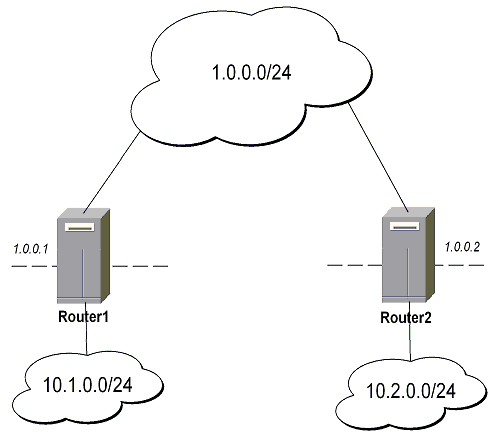
Minimal config example for transport mode ESP with automatic keying on Router 1:
ip ipsec policy add sa-src=1.0.0.1 sa-dst=1.0.0.2 action=encrypt
ip ipsec peer add address=1.0.0.2
ip ipsec pre-shared-secret add address=1.0.0.2 secret="roberkenon"
And for Router 2:
ip ipsec policy add sa-src=1.0.0.2 sa-dst=1.0.0.1 action=encrypt
ip ipsec peer add address=1.0.0.1
ip ipsec pre-shared-secret add address=1.0.0.1 secret="roberkenon"
Minimal config example for tunnel mode AH with manual keying on Router 1:
ip ipsec manual-sa add name=ah-sa1 ah-spi=0x101/0x100 ah-key=abcfed
ip ipsec policy add src-address=10.1.0.0/24 dst-address=10.2.0.0/24 \
   action=encrypt ipsec-protocols=ah tunnel=yes sa-src=1.0.0.1 sa-dst=1.0.0.2 \
   manual-sa=ah-sa1
And for Router 2:
ip ipsec manual-sa add name=ah-sa1 ah-spi=0x100/0x101 ah-key=abcfed
ip ipsec policy add src-address=10.2.0.0/24 dst-address=10.1.0.0/24 \
   action=encrypt ipsec-protocols=ah tunnel=yes sa-src=1.0.0.2 sa-dst=1.0.0.1 \
   manual-sa=ah-sa1
IPsec Setup for Routing Between two Masquerading MikroTik Routers
On Router1: