WaveLAN/ORiNOCO 2.4GHz 11Mbps Wireless Interface
Document revision 22-Mar-2002This document applies to the MikroTik RouterOS V2.4 and V2.5
Overview
The MikroTik RouterOS supports the following WaveLAN/ORiNOCO 2.4GHz 11Mbps Wireless Adapter hardware:
- ORiNOCO 2.4GHz 11Mbps PC Card (Silver/Gold), firmware versions 4.xx...7.52.
- ORiNOCO ISA and PCI adapters for using the PC card in desktop computers.
For more information about the WaveLAN / ORiNOCO adapter hardware please see the relevant User’s Guides and Technical Reference Manuals in .pdf format from the manufacturer:
- orinoco_pc_card_getting_started_guide.pdf ORiNOCO PC Card Getting Started Guide
- orinoco_pc_card_user_guide.pdf ORiNOCO PC Card User's Guide
- orinoco_isa_adapter.pdf ORiNOCO ISA Adapter Getting Started Guide
- orinoco_pci_adapter.pdf ORiNOCO PCI Adapter Getting Started Guide
Information about configuring the ORiNOCO wireless access point can be found there:
- orinoco_ap_1000_guide.pdf ORiNOCO Access Point 1000 (AP-1000) Getting Started Guide
- orinoco_manager_suite_user_guide.pdf ORiNOCO Manager Suit User's Guide
Contents of the Manual
The following topics are covered in this manual:
- Wireless Adapter Hardware and Software Installation
- Wireless Interface Configuration
- Troubleshooting
- Wireless Network Applications
Wireless Adapter Hardware and Software Installation
Software Packages
The MikroTik Router should have the wavelan software package installed. The software package file wavelan-2.x.y.npk can be downloaded from MikroTik’s web page www.mikrotik.com. To install the package, please upload the correct version file to the router and reboot. Use BINARY mode ftp transfer. After successful installation the package should be listed under the installed software packages list, for example:
[MikroTik] > system package print
  # NAME                   VERSION               BUILD-TIME           UNINSTALL
  0 wavelan                2.4                   sep/25/2001 05:08:09 no
  1 routing                2.4                   sep/25/2001 05:06:07 no
  2 ssh                    2.4                   sep/25/2001 05:08:11 no
  3 system                 2.4                   sep/25/2001 05:05:48 no
  4 ppp                    2.4                   sep/25/2001 05:06:35 no
  5 pppoe                  2.4                   sep/25/2001 05:06:45 no
  6 pptp                   2.4                   sep/25/2001 05:06:44 no
[MikroTik] >
Software License
The 2.4GHz wireless adapters require the 2.4GHz wireless feature license. One license is for one installation of the MikroTik RouterOS, disregarding how many cards are installed in one PC box. The wireless feature is not included in the Free Demo or Basic Software License. The 2.4GHz Wireless Feature cannot be obtained for the Free Demo License. It can be obtained only together with the Basic Software License.
System Resource Usage
Before installing the wireless adapter, please check the availability of free IRQ's and I/O base addresses:
[MikroTik] > system resource irq print
 IRQ USED OWNER
 1   yes  keyboard
 2   yes  APIC
 3   no
 4   yes  serial port
 5   yes  Wavelan 802.11
 6   no
 7   no
 8   no
 9   no
 10  yes  Public
 11  yes  Local
 12  no
 13  yes  FPU
 14  yes  IDE 1
 15  yes  PCMCIA service
[MikroTik] > system resource io print
 PORT-RANGE            OWNER
 20-3F                 APIC
 40-5F                 timer
 60-6F                 keyboard
 80-8F                 DMA
 A0-BF                 APIC
 C0-DF                 DMA
 F0-FF                 FPU
 100-13F               Wavelan 802.11
 1F0-1F7               IDE 1
 2F8-2FF               serial port
 3C0-3DF               VGA
 3E0-3E1               PCMCIA service
 3F6-3F6               IDE 1
 3F8-3FF               serial port
 4000-4007             IDE 1
 4008-400F             IDE 2
 6300-631F             Local
 6700-67FF             Public
[MikroTik] >
Installing the Wireless Adapter
The basic installation steps of the wireless adapter should be as follows:- Check the system BIOS settings and make sure you do not have the 'PnP OS Installed' set to 'Yes'. If you have this setting, make sure it is set to 'No'.
- Check the system BIOS settings for peripheral devices, like, Parallel or Serial communication ports. Disable them, if you plan to use IRQ's assigned to them by the BIOS.
Special Notice for PCMCIA-PCI adapter users! The IRQ is not being reported back correctly on some MB for PCMCIA-PCI adapters. As a result, the wireless interface appears to be operational, but there can be no data transmitted over the wireless link. For example, when pinging the AP or GW form the router, there is no response to the ping, although the other end gets the MAC address of the WaveLAN interface of the router. To solve this, try using another MB, or use PCMCIA-ISA adapter.
Loading the Driver for the Wireless Adapter
The WaveLAN / Orinoco PC (PCMCIA) cards do not require a 'manual' driver loading, since they are recognized automatically by the system and the driver is loaded at the system startup. If the driver has loaded successfully, there should be two beeps of equal tone, which should be heard through the PC's speaker while the system startup. If the second beep has a lower tone than the first one, then the driver could not be loaded, or, there is no wavelan package installed.Note! The PC card can be inserted in the PCMCIA-ISA or PCI adapter when the system is running. The wavelan driver is not listed under the list of loaded drivers.
There can be several reasons for a failure to load the driver:
- The driver cannot be loaded because other device uses the requested IRQ.
Try to set different IRQ to other devices. - The requested I/O base address cannot be used on your motherboard.
Change the motherboard.
Wireless Interface Configuration
If the driver has been loaded successfully (no error messages), and you have the required 2.4GHz Wireless Software License, then the WaveLAN/ORiNOCO 2.4GHz Wireless interface should appear under the interfaces list with the name wavelanX, where X is 1,2,... You can change the interface name to a more descriptive one using the 'set' command. To enable the interface, use the 'enable' command:
[MikroTik] interface> print
Flags: X - disabled, D - dynamic
  #   NAME                 MTU   TYPE
  0   Public               1500  ether
  1   Local                1500  ether
  2 X wavelan1             1500  wavelan
[MikroTik] interface> enable 2
[MikroTik] interface> print
Flags: X - disabled, D - dynamic
  #   NAME                 MTU   TYPE
  0   Public               1500  ether
  1   Local                1500  ether
  2   wavelan1             1500  wavelan
[MikroTik] interface>
More configuration and statistics parameters can be found under the '/interface wavelan' menu:
[MikroTik] interface> wavelan
[MikroTik] interface wavelan> print
Flags: X - disabled
  0   name=wavelan1 mtu=1500 mac-address=00:02:2D:07:D8:44 arp=enabled
      frequency=2412MHz data-rate=11Mbit/s mode=ad-hoc ssid="" client-name=""
      key1="" key2="" key3="" key4="" tx-key=key1 encryption=no

[MikroTik] interface wavelan>
Argument description:
number - Interface number in the list
name - Interface name
mtu - Maximum Transmit Unit (256...2296 bytes). The default value is 1500 bytes.
mac-address - MAC address of the card. Cannot be changed.
frequency - Channel frequency (2412MHz / 2422MHz / ... / 2484MHz)
data-rate - Data rate (11Mbit/s / 1Mbit/s / 2Mbit/s / 5.5Mbit/s / auto)
mode - Operation mode of the card (infrastructure / ad-hoc)
ssid - Service Set Identifier
client-name - Client name
key1 - Encryption key #1
key2 - Encryption key #2
key3 - Encryption key #3
key4 - Encryption key #4
tx-key - Transmit key (key1 / key2 / key3 / key4)
encryption - Encryption (no / yes)
arp - Address Resolution Protocol (disabled / enabled / proxy-arp)
You can monitor the status of the wireless interface:
[MikroTik] interface wavelan>
             bssid: 44:44:44:44:44:44
         frequency: 2422MHz
         data-rate: 11Mbit/s
              ssid: tsunami
    signal-quality: 0
      signal-level: 0
             noise: 0

[MikroTik] interface wavelan>
To set the wireless interface for working with an IEEE 802.11b access point (register to the AP), you should set the following parameters:
- The Service Set Identifier. It should match the ssid of the AP.
- The Operation Mode of the card should be set to 'infrastructure'.
- The Data Rate of the card should match one of the supported data rates of the AP. Data rate 'auto' should work for most of the cases.
[MikroTik] interface wavelan> set 0 ssid MT_w_AP mode infrastructure
[MikroTik] interface wavelan> monitor wavelan1
             bssid: 00:40:96:42:0C:9C
         frequency: 2437MHz
         data-rate: 11Mbit/s
              ssid: MT_w_AP
    signal-quality: 65
      signal-level: 228
             noise: 163

[MikroTik] interface wavelan>
- The wavelan interface does not show up under the interfaces list
Obtain the required license for 2.4GHz wireless feature. - The wireless card does not register to the AP
Check the cabling and antenna alignment. - I get the wireless interface working and registering to the AP,
but there is no data transmitted, I cannot ping the AP
This is IRQ conflict. See the special notice for PCMCIA-PCI adapter users under the Wireless Adapter Installation instructions above.
Wireless Network Applications
Two possible wireless network configurations are discussed in the following examples:
- Point-to-Multipoint (Wireless Infrastructure)
- Point-to-Point with MikroTik Client (Peer-to-Peer, or Ad-Hoc Wireless LAN)
- Point-to-Point with Windows Client (Peer-to-Peer, or Ad-Hoc Wireless LAN)
Point-to-Multipoint Wireless LAN
Let us consider the following network setup with WaveLAN / ORiNOCO or CISCO/Aironet Wireless Access Point as a base station and MikroTik Wireless Router as a client:
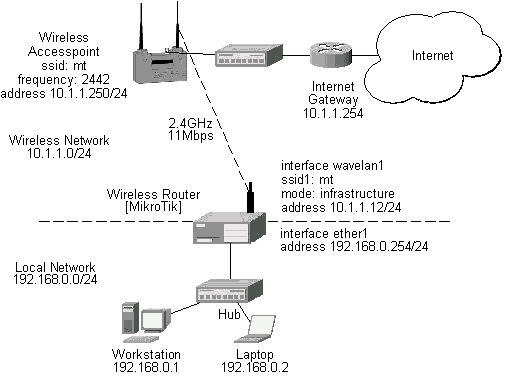
The access point is connected to the wired network's HUB and has IP address from the network 10.1.1.0/24. The minimum configuration required for the AP is:
- Setting the Service Set Identifier (up to 32 alphanumeric characters). In our case we use ssid "mt".
- Setting the allowed data rates at 1-11Mbps, and the basic rate at 1Mbps.
- Choosing the frequency, in our case we use 2452MHz.
- Setting the identity parameters: ip address/mask and gateway. These are required if you want to access the AP remotely.
Reminder! Please note, that the AP is not a router! It has just one network address, and is just like any host on the network. It resembles a wireless-to-Ethernet HUB or bridge. The AP does not route the IP traffic!
The minimum configuration for the MikroTik router's wavelan wireless interface is:
- Setting the Service Set Identifier to that of the AP, i.e., "mt"
- Setting the Operation Mode to "infrastructure"
[MikroTik] interface wavelan> set wavelan1 ssid mt mode infrastructure
[MikroTik] interface wavelan>
             bssid: 00:40:96:42:0C:9C
         frequency: 2437MHz
         data-rate: 11Mbit/s
              ssid: mt
    signal-quality: 64
      signal-level: 228
             noise: 163

[MikroTik] interface wavelan>
The channel frequency argument does not have any meaning, since the frequency of the AP is used.
IP Network Configuration
The IP addresses assigned to the wireless interface should be from the network 10.1.1.0/24, e.g.:
[MikroTik] ip address> add address 10.1.1.12/24 interface wavelan1
[MikroTik] ip address> add address 192.168.0.254/24 interface ether1
[MikroTik] ip address> print
Flags: X - disabled, I - invalid, D - dynamic
  #   ADDRESS            NETWORK         BROADCAST       INTERFACE
  0   192.168.0.254/24   192.168.0.0     192.168.0.255   ether1
  1   10.1.1.12/24       10.1.1.0        10.1.1.255      wavelan1
[MikroTik] ip address>
The default route should be set to the gateway router 10.1.1.254 (not the AP 10.1.1.250 !):
[MikroTik] ip route> add gateway 10.1.1.254
[MikroTik] ip route> print
Flags: X - disabled, I - invalid, D - dynamic, R - rejected
  #    TYPE    DST-ADDRESS        NEXTHOP-S... GATEWAY     DISTANCE INTERFACE
  0    static  0.0.0.0/0          A            10.1.1.254  1        wavelan1
  1 D  connect 192.168.0.0/24     A            0.0.0.0     0        ether1
  2 D  connect 10.1.1.0/24        A            0.0.0.0     0        wavelan1
[MikroTik] ip route>