Network setups with EoIP interfaces:
Specific Properties:
EoIP Setup
IP EoIP Interface management can be accessed under
the /interface eoip submenu.
You can add an EoIP tunnel interface using the /interface eoip add command:
[MikroTik] interface eoip> add
Creates new item with specified property values.
             arp  Address Resolution Protocol
       copy-from  Item number
             mtu  Maximum Trasfer Unit
            name  New tunnel name
  remote-address  Remote address of tunnel
       tunnel-id  ID of tunnel
[MikroTik_1] interface eoip> add name to_mt2 tunnel-id 1 remote-address 10.5.8.1
[MikroTik_1] interface eoip> print
Flags: X - disabled
  0 X name=to_mt2 mtu=1500 arp=enabled tunnel-id=1 remote-address=10.5.8.1

[MikroTik_1] interface eoip> enable 0
[MikroTik_1] interface eoip> print
Flags: X - disabled
  0   name=to_mt2 mtu=1500 arp=enabled tunnel-id=1 remote-address=10.5.8.1
      mac-address=fe:fd:00:00:00:00

[MikroTik_1] interface eoip>
Descriptions of settings:
name - Interface name for reference
mtu - Maximum Transmit Unit. Should be the default 1500 bytes.
mac-address - A default virtual MAC address is generated. It cannot be changed.
arp - Address resolution protocol (disabled / enabled / proxy-arp). Enabled by default.
tunnel-id - Should be a number from 0-16 which has not been used for another EoIP tunnel.
remote-address - The IP address of the other side of the EoIP tunnel – must be a MikroTik router.
For diagnostic purposes, you can assign an IP address to the EoIP interface.
The router at the other end should have the same tunnel-id value, and should have the remote-address set to [MikroTik_1].
There is no authentication or 'state' for this interface.
The bandwidth usage of the interface may be monitored with the 'monitor'
feature from the '/interface' menu.
EoIP Application Example
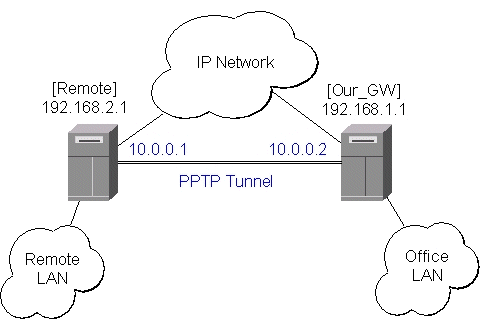
Let us assume we want to bridge two networks: 'Office LAN' and 'Remote LAN'. The networks are connected to an IP network through the routers [Our_GW] and [Remote]. The IP network can be a private intranet or the Internet. Both routers can communicate with each other through the IP network.
Our goal is to create a secure channel between the routers and bridge both networks through it. The network setup diagram is as follows:
To make a secure Ethernet bridge between two routers you should:
[Our_GW] interface pptp-static-server>/user add name=joe group=ppp password=top_s3
[Our_GW] interface pptp-static-server>
add name="from_remote" client-address=192.168.2.1 mtu=1500 mru=1500 \
    local-address=10.0.0.1 remote-address=10.0.0.2 encryption=required
[Our_GW] interface pptp-static-server> enable from_remote
[Our_GW] interface pptp-static-server> print
Flags: X - disabled
  0   name=from_remote client-address=192.168.2.1 mtu=1500 mru=1500 pap=no chap=no
      ms-chapv2=yes local-address=10.0.0.1 remote-address=10.0.0.2 idle-timeout=0s
      session-timeout=0s encryption=required

[Our_GW] interface pptp-static-server>
The Remote router will be the pptp client:
[Remote] interface pptp-client>
add name=pptp user=joe connect-to=192.168.1.1 mtu=1500 mru=1500 encryption=required
[Remote] interface pptp-client> enable pptp
[Remote] interface pptp-client> print
Flags: X - disabled
  0   name=pptp user=joe connect-to=192.168.1.1 mtu=1500 mru=1500 pap=no
      chap=no ms-chapv2=yes idle-timeout=0s session-timeout=0s encryption=required
      add-default-route=no

[Remote] interface pptp-client> monitor pptp
      uptime: 39m19s
    encoding: MPPE 128 bit, stateless
      status: Connected

[Remote] interface pptp-client>
See the PPTP Interface Manual for more details on setting up encrypted channels.
[Our_GW] interface eoip>
add name="eoip-remote" tunnel-id=0 remote-address=10.0.0.2
enable eoip-remote
[Our_GW] interface eoip> print
Flags: X - disabled
  0   name=eoip-remote mtu=1500 arp=enabled tunnel-id=0 remote-address=10.0.0.2
[Our_GW] interface eoip>

[Remote] interface eoip>
add name="eoip" tunnel-id=0 remote-address=10.0.0.1
enable eoip-main
[Remote] interface eoip> print
Flags: X - disabled
  0   name=eoip mtu=1500 arp=enabled tunnel-id=0 remote-address=10.0.0.1

[Remote] interface eoip>
[Our_GW] > /bridge print
           ip: forward
          ipx: discard
    appletalk: discard
         ipv6: discard
          arp: forward
        other: forward
     priority: 1
[Our_GW] > /bridge interface print
  # INTERFACE                                                 FORWARD
  0 eoip-remote                                               yes
  1 office-eth                                                yes
  2 isp                                                       no
[Our_GW] > interface print
Flags: X - disabled, D - dynamic
  #   NAME                 MTU   TYPE
  0   from_remote          1500  pptp-in
  1   eoip-remote          1500  eoip-tunnel
  2   office-eth           1500  ether
  3   isp                  1500  ether
  4   bridge1              1500  bridge
[Our_GW] >

[Remote] > bridge print
           ip: forward
          ipx: discard
    appletalk: discard
         ipv6: discard
          arp: forward
        other: forward
     priority: 1
[Remote] > bridge interface print
  # INTERFACE                                            FORWARD
  0 ether1                                               yes
  1 adsl                                                 no
  2 eoip-main                                            yes
[Remote] > interface print
Flags: X - disabled, D - dynamic
  #   NAME                 MTU   TYPE
  0   ether1               1500  ether
  1   isp1                 1500  ether
  2   pptp                 1500  pptp-out
  3   bridge1              1500  bridge
  4   eoip                 1500  eoip-tunnel
[Remote] >